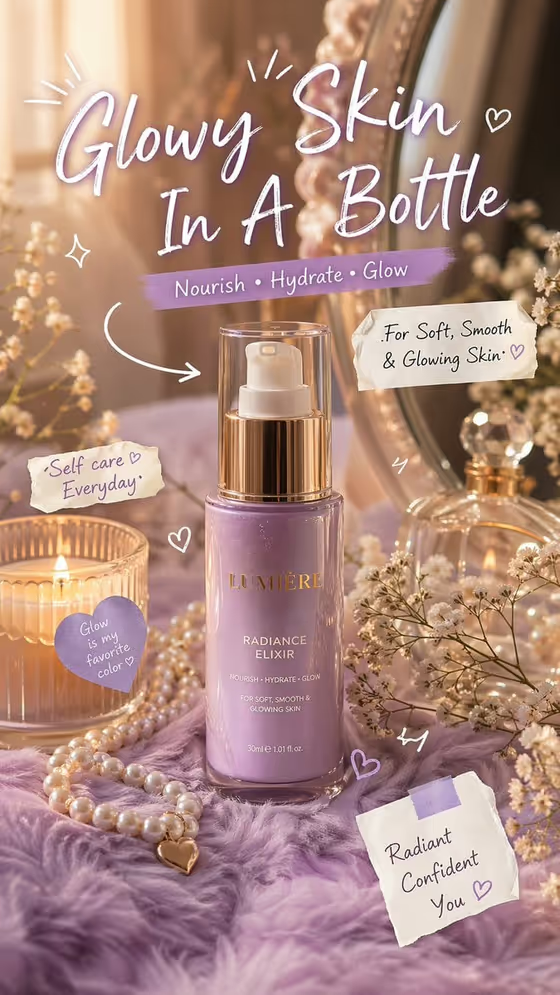
Glowy Skincare Doodles turns a skincare product into a vertical (3:4) vanity-style ad. The scene is built around a glossy bottle, a mirror, pearls, a candle, baby's-breath flowers and a fluffy surface, with warm golden light and soft bokeh behind it.
On top of that setup, the template adds hand-drawn arrows, sparkles, hearts, paper-note stickers and a large handwritten headline. It suits small beauty brands, skincare creators and anyone who wants a launch visual with a soft, feminine, scrapbook feel.
The template has three fields: Skincare Product, Beauty Headline and Pastel Color World.
What works best as input
- For Skincare Product, you can describe the product in text or add a photo of it, since that field accepts a photo. A clear shot of the real bottle, jar or tube is the best way to point the result at your actual packaging.
- If you use a photo, pick one where the product is fully in frame, evenly lit and not cropped. Readable label text and a clean shape give the template more to work with.
- If you describe it instead, be specific about the container and what it is, like 'a hydrating serum bottle', 'a nourishing face cream jar', 'a luminous facial oil' or 'a gentle toner bottle'.
- The Beauty Headline field is text only, so type the line you want handwritten on the ad. Short, warm phrases such as 'Your Daily Dew' or 'Glow From Within' fit the doodle style well.
How to use it
- Open the Glowy Skincare Doodles template in Phosphene.
- In Skincare Product, describe your product or add a photo of it, whichever the field offers you.
- Type your campaign line into Beauty Headline, then pick a palette in Pastel Color World (for example Lavender and warm gold or Blush pink and pearl).
- Generate the image, then look it over for headline spelling, product shape and overall color before saving or regenerating.
Tips for a better result
- Keep the headline short. A handful of words reads clearly as large handwriting and leaves room for the doodles around it.
- Try each Pastel Color World option with the same product and headline. Lavender and warm gold, Blush pink and pearl, Powder blue and silver, and Peach cream and champagne each change the whole mood of the vanity.
- Match the palette to your packaging. A lilac bottle sits naturally in a lavender scene, while a cream jar may look better in peach cream and champagne.
- If the product looks off, regenerate with a more exact description or a cleaner reference photo rather than only changing the headline.
Common mistakes
- Writing a long sentence as the headline. The template places it as large handwritten text, so long copy is harder to fit and read.
- Using a vague product description like 'skincare' instead of naming the type of container and product.
- Adding a cluttered or dark product photo, which gives the template a weaker reference for the bottle's shape and label.
FAQ
Can I upload a photo of my product?
Yes. The Skincare Product field accepts a photo as well as a text description, so you can add your own product reference.
Can I add my own text on the ad?
You control the main handwritten headline through the Beauty Headline field. The template also adds restrained supporting benefit copy and small doodled notes as part of its design.
What shape is the result?
The output is a single image in a 3:4 vertical ratio.
Can I change the colors?
Yes, through Pastel Color World. Choose from the listed palettes such as Lavender and warm gold, Blush pink and pearl, Powder blue and silver, or Peach cream and champagne.