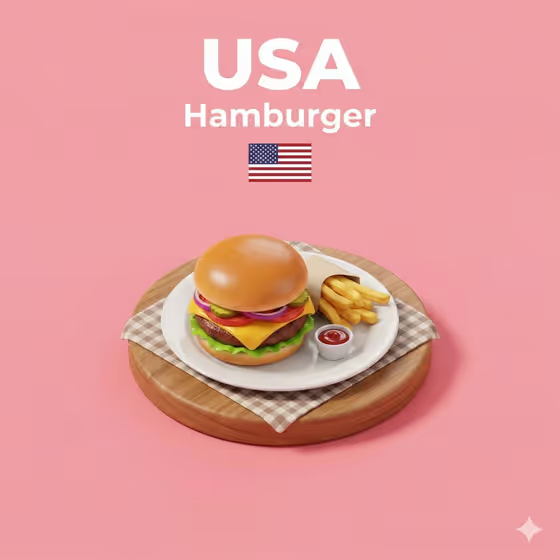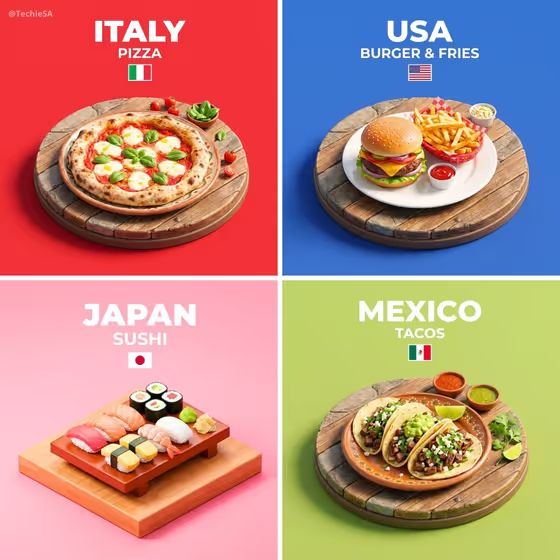
Signature Dish Diorama Base turns a dish into a small isometric 3D-style scene, viewed from a 45-degree top-down angle. The dish sits on a raised base with a few simple extras like a plate, a table surface or a light garnish, set against a clean solid background. A large title and a smaller tagline appear above it, with a small flag-style icon underneath, as in the four-panel cover (pizza, burger and fries, sushi, tacos).
It suits food creators, restaurant owners and anyone building a themed series of dish cards, such as one dish per country or per menu section. The output is a 3:4 image, so it works well for posts and posters.
What works best as input
- The slot called Featured product or object accepts a photo or a short text description. Choose a photo where the dish is clearly the main subject, with nothing else competing for attention.
- If you describe it in text, be specific about the dish itself, such as a margherita pizza with basil or a plate of street tacos, rather than a general word like food.
- Pick a photo with even lighting and a clear view of the dish's shape, toppings and colors, so the diorama can keep those recognizable details.
- Show one dish at a time. A single plate or serving gives a cleaner base than a crowded table.
How to use it
- Open the Signature Dish Diorama Base template in Phosphene.
- In Featured product or object, upload a photo of your dish or type a short description of it.
- In Creative direction, pick or write a mood, for example Clean editorial, Playful colorful or Quiet premium.
- Generate the image, then check the dish, the title and tagline text and the base. Adjust your inputs and run it again if something is off.
Tips for a better result
- Try different Creative direction choices on the same dish. Playful colorful suits casual street food, while Quiet premium may suit a refined plate.
- Name the dish precisely. The more recognizable the presentation, the better the diorama reads at a glance.
- Make a set by keeping the same Creative direction and changing only the dish. This gives a consistent series like the cover's four panels.
- If a result misses the mark, simplify your description to the dish's key elements and generate again.
Common mistakes
- Using a busy photo with several dishes, people or cluttered surroundings, which makes it unclear what the diorama should feature.
- Entering a vague description such as a meal, which gives the scene little to build a recognizable presentation from.
- Writing a long, complicated Creative direction. A short mood phrase is easier to follow.
FAQ
Do I have to upload a photo?
No. The Featured product or object slot accepts a photo or a text description, so you can type the dish instead.
What shape is the result?
The output is a single image in a 3:4 aspect ratio.
Can I use it for things other than food?
The slot is labeled for a product or object, but the template is built around presenting a signature dish on a small raised base, so dishes will fit it best.
What does the Creative direction field do?
It sets the overall mood of the visual. You can choose an example like Clean editorial or Cinematic dramatic, or describe your own.