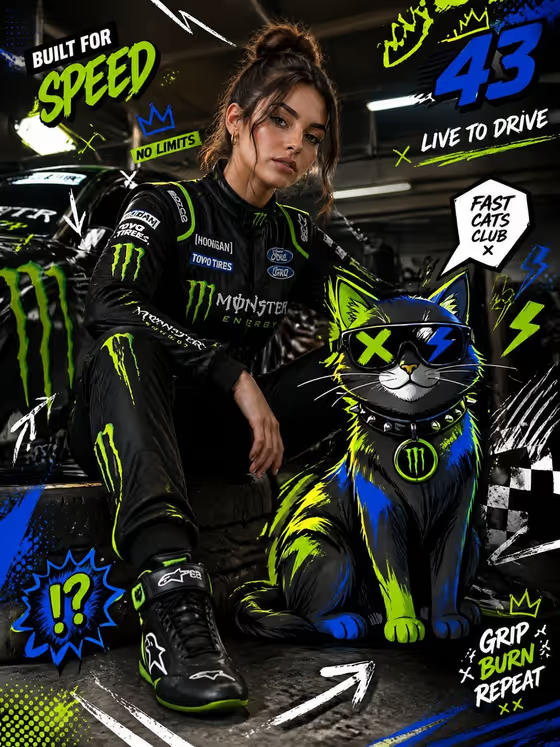
Racing Fashion Editorial turns a portrait subject into a full-body motorsport fashion image. The model wears racing gear with a racing suit draped off the body, and a bold cartoon cat sits beside them in a neon palette. Graphic doodles like arrows, speed lines, scribbles and checkered flag marks sit over the photographic scene.
It suits creators, designers and social media teams who want a poster-style racing editorial with a mixed-media look. You supply the subject and pick the pose and scene, and the template handles the garage setting, the styling and the illustrated overlays. The result is a 3:4 image.
What works best as input
- Use the first field, labeled 'confident racing model portrait subject', to describe your subject in a few words or to upload a reference photo of them. Both are allowed by this slot.
- Choose a clear, well-lit photo where the face is visible and unobstructed. This gives the template a reliable reference to build the full-body figure from.
- A single subject works best. Photos with several people can make it unclear who the editorial is about.
- If you type instead of uploading, stay close to the placeholder style, such as 'a confident racing model' or 'an editorial portrait subject', and add one or two specific traits.
- Only use photos of people you have permission to use, and keep descriptions respectful.
How to use it
- Open the Racing Fashion Editorial template in Phosphene.
- In 'confident racing model portrait subject', type a short description or upload your reference photo.
- In 'Pose and scene', pick the framing option you want, such as a full-body editorial frame or a closer portrait.
- Generate the image, then review the face, the draped suit, the cat and the overlay graphics, and adjust your inputs if something is off.
Tips for a better result
- Try the different 'Pose and scene' options to compare a full-body editorial frame against a closer or more candid framing.
- Keep the subject description simple. The template already fixes the garage setting, the racing outfit and the cartoon cat, so extra detail is best spent on the person.
- Run the same subject with a typed description and again with an uploaded photo to see which gives you a closer likeness.
- Use the 3:4 result as a poster or social cover, since the overlay text-style doodles and speed lines are composed for that vertical shape.
Common mistakes
- Writing a long, complicated subject description that fights the fixed styling. The outfit, cat and garage are set by the template, so describing a different outfit or location will not override them.
- Uploading a small, dark or heavily cropped photo. A face that is hard to read gives weaker results.
- Leaving the subject field vague or empty-feeling, such as a single generic word, which gives the template little to work from.
FAQ
Do I have to upload a photo?
No. The subject field accepts either a typed description or an uploaded reference, so you can use whichever you prefer.
Can I change the cat or the car in the background?
No. The cartoon cat, the garage pit lane and the overall editorial style are part of the template's fixed direction. You control the subject and the pose and scene.
What does the Pose and scene option change?
It sets how the shot is framed, for example a full-body editorial frame, an intimate close portrait or an environmental candid frame, without changing the template's defining look.
What shape is the output?
The output is a single image in a 3:4 vertical aspect ratio.