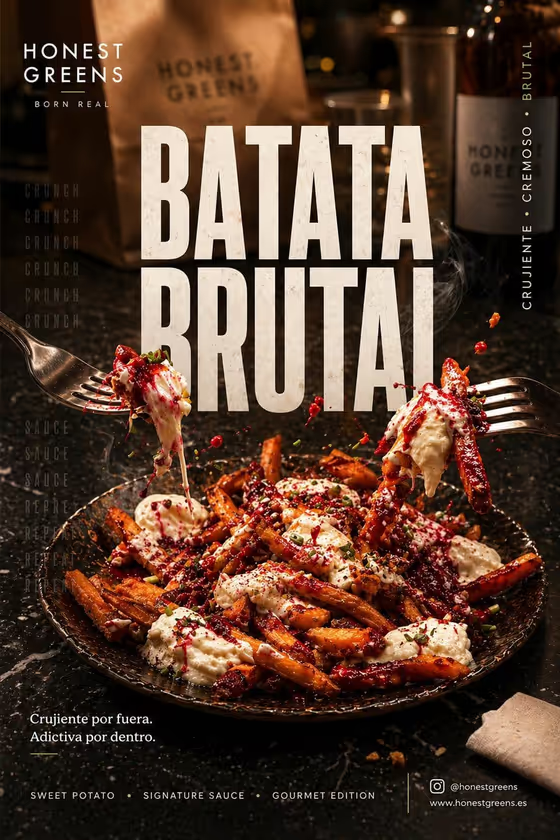
Gourmet Bar Poster turns one dish into a vertical, 3:4 restaurant campaign image. The cover shows the idea: a plate of sauced sweet-potato fries on dark stone, one fry lifted on a fork with cream stretching and red droplets frozen in the air, a second fork coming in from the side, and a big condensed headline above the plate.
It suits restaurant owners, bar managers and food creators who want a bold social poster without setting up a photo shoot. You provide the featured dish and a headline, and the template handles the gastro-bar setting, warm food lighting, marble reflections and poster layout.
What works best as input
- For the Featured gourmet dish field, you can upload a photo of your dish or describe it in text. A clear photo of the real plate helps the poster stay close to what you actually serve.
- Pick a photo where the dish is well lit and fully visible, with the food filling most of the frame and no heavy filters or text on top of it.
- If you describe the dish instead, name the main food, the sauces and the toppings, for example the cover's crispy sweet-potato fries with cream and a red sauce.
- Keep the Poster headline short and punchy, like BATATA BRUTAL or SHARE THE CRUNCH. The headline is set as large condensed type, so a few words read best.
- Type the headline exactly as you want it spelled, including accents or capitals, since it appears as printed poster text.
How to use it
- Open the Gourmet Bar Poster template in Phosphene.
- In Featured gourmet dish, upload a photo of your dish or type a short description of it.
- In Poster headline, enter the title you want across the top of the poster.
- Generate the image, then check the dish, the headline spelling and the sauce details before saving or sharing.
Tips for a better result
- Try different headlines from the examples, such as CRISPY OBSESSION or SIGNATURE SWEET POTATO, to see how the same dish feels with a different message.
- Use a sharper, brighter dish photo if the first result loses detail. The template puts the focus on the food, so a clear source helps.
- Describe distinctive textures and sauces in the dish field (glossy, crispy, creamy, herbs) so the details match your menu.
- Run the template again with the same inputs to compare versions and pick the composition you like best.
Common mistakes
- Using a dark, blurry or cluttered dish photo, which gives the poster less to work with and can blur the hero food.
- Writing a long headline or a full sentence. The type is big and condensed, so long text can feel crowded or get misspelled.
- Expecting a different setting. The template keeps the dark-marble gastro bar, forks and dripping sauce look, so it works best for dishes that suit that mood.
FAQ
Do I have to upload a photo?
No. The Featured gourmet dish field accepts a photo or a text description, so you can type the dish instead.
Can I use a dish other than sweet potato fries?
You can enter any featured dish, but the template's fixed direction is built around the sweet-potato look from the cover, so results may lean toward that style.
Can I change the headline text?
Yes. The Poster headline field is required and takes any short title you type.
What shape is the poster?
It is a vertical 3:4 image, which suits social posts and printed-style posters.