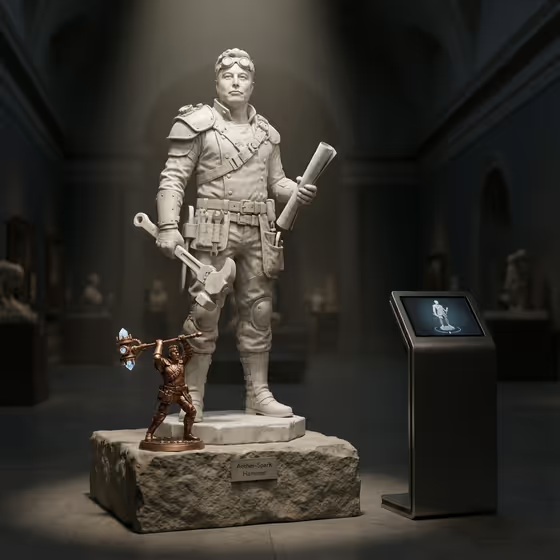
Marble RPG Class Statue turns a portrait into a museum-style scene: a life-size marble figure on a stone plinth in a dark hall, dressed as a fantasy RPG class, with a small bronze mini-statue of a signature relic at its feet. The cover shows this layout, with a pale statue holding a wrench and a rolled plan, a copper figure raising a glowing hammer, a placard on the plinth, and a small display kiosk beside it.
It suits anyone who likes character-class concepts, collectible-style art, or playful tributes in a gallery setting. You supply a portrait subject, a featured prop, and a creative direction, and the template builds the class, the relic, and the scene around them.
What works best as input
- The template asks for 2 or more photos. Use clear, well-lit portraits of the same person from slightly different angles so the face and build read consistently in the marble.
- In the Portrait subject field you can add photos or describe the person in text. If you describe instead, be concrete, for example a confident adult or a distinctive creative professional, rather than a vague one-word label.
- Only use photos of yourself, people who have agreed to it, or subjects you are comfortable depicting respectfully. Keep the result a fantasy tribute, not a way to mock or misrepresent someone.
- For Featured product or prop, name one specific object or add a photo of it. The cover shows how a single clear tool or relic can become both a held item and a small bronze statue.
- Pick photos where the face is not hidden by sunglasses, heavy filters, or tight crops, since the statue needs to stay recognizable.
How to use it
- Open the Marble RPG Class Statue template in Phosphene and add your 2 or more photos or text descriptions to the Portrait subject field.
- Fill in Featured product or prop with a short description or a photo of the object you want represented as the signature relic.
- Choose a Creative direction, such as Clean editorial, Cinematic dramatic, Playful colorful, or Quiet premium, then generate the image.
- Review the 3:4 result. Check the statue's likeness, the bronze relic at its feet, and the plinth placard, then adjust your inputs and run it again if something is off.
Tips for a better result
- Try different Creative direction options on the same inputs. Cinematic dramatic should suit the moody museum lighting, while Playful colorful will push the scene away from pale marble.
- Choose a prop with a strong silhouette. A tool, weapon-like object, or distinctive device reads clearly both in the statue's hand and as the small bronze version.
- Add personality cues in the Portrait subject text, such as a profession or temperament, since the template recasts the person as a class based on how they show up in their story.
- Run a few generations with slightly different prop wording to compare relic designs and pick the one that fits best.
Common mistakes
- Uploading only one photo or very different-looking photos of unrelated people, which makes the likeness inconsistent.
- Writing a vague prop like a thing or an object, which gives the relic no clear shape or story.
- Expecting an exact copy of the cover scene. The class, relic, and details are reinterpreted for each subject, so results will differ.
FAQ
How many photos do I need?
The template is set to require 2 or more photos. Clear portraits from a couple of angles work best.
Can I describe the person instead of uploading a photo?
The Portrait subject field accepts text or a photo, so you can describe the subject. Photos will generally give the statue a closer likeness.
What is the small bronze figure at the base?
It is the signature relic, a small detailed bronze mini-statue symbolizing the subject's legacy, like the glowing hammer in the cover image.
What shape will the image be?
The output is an image in a 3:4 aspect ratio.