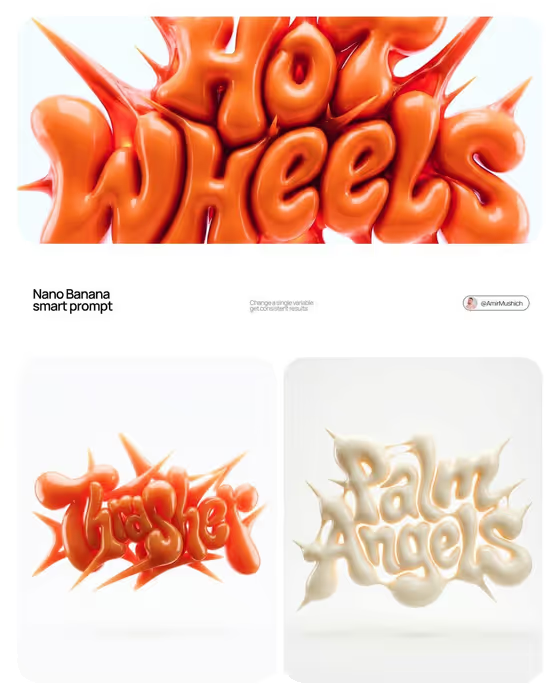
This template turns a brand name into a glossy, inflated 3D typeform. Letters swell like balloons, fuse into one continuous mass, and sprout sharp spikes between and around them, in the spirit of Y2K graffiti and streetwear lettering. The cover shows the idea clearly: a single material, soft highlights, and a clean white studio background.
It suits designers, founders, and social teams who want a bold wordmark visual for a launch, a poster, or a brand mood board. You describe the brand and pick a color palette, and the template builds a square image around them.
What works best as input
- In the Brand Identity field, type the exact word or logotype you want sculpted, for example your brand name, plus a short note on what the brand is (the examples include a modern lifestyle brand or a creative technology studio).
- This field accepts a photo as an exact visual reference, so add one if you want the letterform or logo to follow a specific design. Choose an image where the lettering is clear and uncluttered.
- Keep the name short. The cover examples use one or two words, and shorter names leave room for the swollen letters and spikes to stay readable.
- For the Color Palette, name a clear pair or family of colors such as Cobalt blue and warm cream or Burgundy and blush. The whole sculpture is built from one color family, so a focused palette works best.
How to use it
- Open the Inflatable Graffiti Logo Sculpture template in Phosphene.
- Fill in Brand Identity with your brand name and a short description, or attach a reference image of the exact logo or lettering.
- Set the Color Palette to the colors you want the sculpture made from.
- Generate the image, then check that the letters are readable and the color matches your palette. Adjust the fields and run it again if needed.
Tips for a better result
- Try the same brand name with different palettes. The template keeps one material across the whole sculpture, so changing only the color gives you a consistent set, like the orange and cream examples on the cover.
- Use a tonal palette (one hue family) for the most convincing balloon look, since highlights and shadows are built from shades of the color you choose.
- If the first result is hard to read, shorten the name or write it in clear capitals in the Brand Identity field.
- Add a short brand descriptor alongside the name to nudge the mood without changing the inflated style.
Common mistakes
- Typing a long phrase or tagline. Fused, overlapping letters get hard to read when there is too much text.
- Choosing a palette with many unrelated colors. The sculpture uses one color family, so a scattered palette works against the design.
- Uploading a busy or low-contrast image as the reference, which makes the lettering difficult to follow.
FAQ
Can I use my own logo as a reference?
Yes. The Brand Identity field accepts a photo as an exact visual reference, so you can attach your logo or lettering instead of only typing a description.
Why is the background always white?
The template stages the sculpture on a clean white studio background so the glossy form is the single focal point.
Can I get multiple colors on different letters?
No. The sculpture uses one unified material in your chosen palette, with tonal variation only for highlights and shadows.
What shape is the result?
The output is a square 1:1 image.