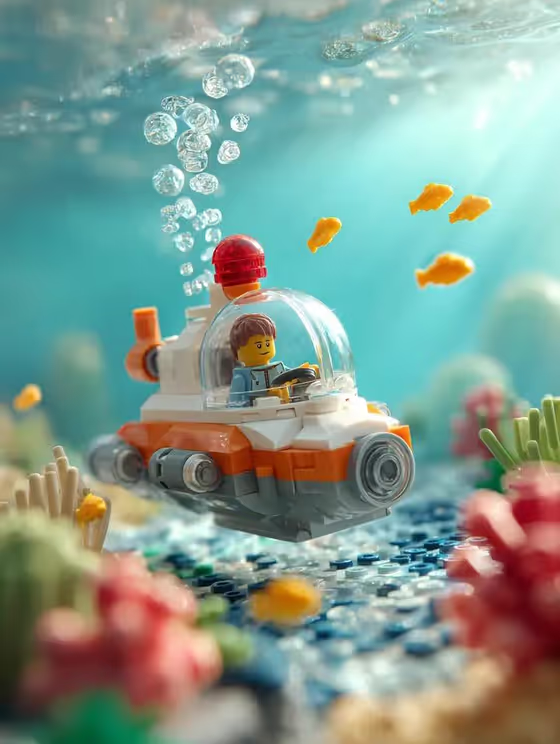
LEGO Submarine Reef builds a macro underwater scene around your subject. Small yellow LEGO fish swim at different depths, bubbles rise in sharp detail, and the seabed is made of brick-built sand, blue tiles, and red, green, and yellow coral.
It suits anyone who wants a playful, toy-photography look: LEGO fans, people making cover art or desk wallpapers, or anyone who wants a favorite object or character placed in a miniature ocean world. The result is a 3:4 image with soft light rays and a blurred, bokeh background.
What works best as input
- The first field, LEGO submarine scene subject or object, accepts either typed text or an uploaded photo. Use whichever describes your subject more clearly.
- If you type, keep it short and concrete, like the placeholder "a LEGO submarine". Add one or two details such as color or a small pilot figure rather than a long paragraph.
- If you upload a reference, pick a clear photo of a single subject with the whole object visible and good lighting, so the template can follow its real shape and colors.
- Avoid cluttered photos with several competing objects, since the scene is built around one main subject.
- Only use subjects and photos you own or have the right to use.
How to use it
- Open the LEGO Submarine Reef template in Phosphene.
- In the subject field, type what the scene should surround (for example "a LEGO submarine") or upload a reference photo of it.
- Choose a Scene framing option, such as a wide environmental view, a medium narrative frame, or a close detail study.
- Generate the image, then review the fish, bubbles, and coral seabed, and adjust your subject text or framing and run it again if needed.
Tips for a better result
- Try the close detail study framing when you want the subject large with strong background blur, and the wide environmental view to show more of the reef.
- Add small, specific details to your subject text, like a color scheme or a tiny pilot, to echo the orange and white submarine look of the cover.
- Run the same subject with different framing choices to compare compositions side by side.
- Try other subjects the template suggests, like an original subject in the same world, to see how the brick reef adapts around them.
Common mistakes
- Writing a long, multi-subject description. The scene is built around one hero subject, so extra objects can muddy the result.
- Uploading a blurry or heavily cropped photo, which gives the template little to follow.
- Expecting the reef style to change. The brick seabed, yellow fish, and macro lighting are fixed, so use the subject and framing fields for variety.
FAQ
Do I have to upload a photo?
No. The subject field accepts typed text, and a photo upload is optional. Use whichever describes your subject better.
What does the Scene framing option change?
It sets how the finished image is composed, for example a wide environmental view, a medium narrative frame, or a close detail study. The LEGO reef look stays the same.
Can I use something other than a submarine?
Yes. The subject field is open, so you can describe another object or character, and the fish, bubbles, and brick coral will be built around it.
What shape is the output?
The template produces a single image in a 3:4 portrait aspect ratio.