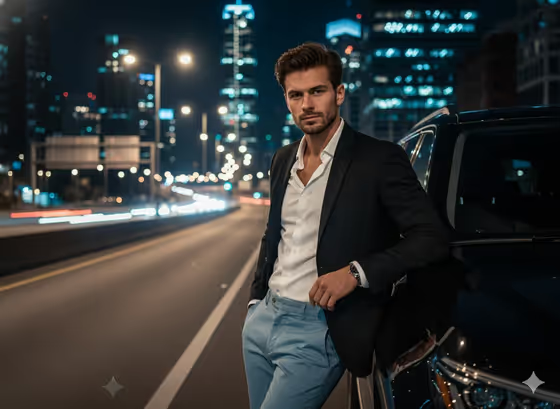
Midnight Highway Authority creates a nighttime portrait of one person leaning against a black luxury SUV on a city highway. Behind them, skyscraper windows glow, streetlights blur into soft bokeh and long traffic trails stretch down the road, giving the image a moody lifestyle campaign feel.
It suits anyone who wants a polished, high-contrast portrait for a profile picture, a personal brand shoot, a fashion mood board or a social post. The output is a single 3:4 image, so it works well as a vertical frame.
You choose who appears and what they wear, and the template handles the pose, the setting and the cinematic color grading.
What works best as input
- For the Portrait person or subject field, you can upload a photo or type a short description. Uploading is the better route when you want the result to resemble a specific person.
- Pick a clear, well-lit photo where the face is sharp and fully visible, ideally from the chest up or a half-body view. A front or slight three-quarter angle gives the model the most to work with.
- Use a photo of yourself or someone who has agreed to be pictured. Avoid images of public figures or anyone who has not given permission.
- If you describe instead of upload, keep it short and concrete, like the placeholder 'a confident handsome adult man' or 'a poised adult woman'. Mention age range, build and grooming if they matter to you.
- Avoid photos with sunglasses, heavy filters, or faces partly covered, since these hide the features you want carried into the portrait.
How to use it
- Open the Midnight Highway Authority template in Phosphene.
- In Portrait person or subject, upload your photo or type a description of the person, using one of the example styles as a guide.
- In Evening wardrobe, choose or write the outfit, for example 'black blazer, open white shirt and blue trousers' or 'dark trench and ivory tailoring'.
- Generate the image, then review the face, the outfit and the pose against the car. If something is off, adjust your inputs and generate again.
Tips for a better result
- Try contrasting wardrobe colors against the dark scene. The cover look pairs a dark blazer with a white shirt and light blue trousers, which stands out clearly against the night background.
- Experiment with the other example looks, such as 'velvet jacket and cream separates', to change the mood while keeping the same highway setting.
- Be specific in the wardrobe field about layers and colors, for example naming the jacket, shirt and trousers separately, so each piece shows up as intended.
- Run the template a few times with small wording changes in the subject or outfit. Each generation can vary the pose details and background lights.
Common mistakes
- Uploading a small, blurry or dark photo. The portrait will only be as clear as the face you provide.
- Writing a long, vague wardrobe description. A cluttered list of items can lead to an outfit that looks muddled instead of the sharp tailoring the template aims for.
- Trying to change the scene, such as asking for a daytime road or a different vehicle. The highway, SUV and night lighting are fixed parts of this template.
FAQ
Do I have to upload a photo?
No. The subject field accepts a text description or an uploaded reference, so you can type something like 'a poised adult woman' if you prefer not to upload.
Can I change the car or the time of day?
Not through this template. It is built around a black luxury SUV on a city highway at night, with skyline glow and light trails.
What shape is the final image?
The output is a single image in a 3:4 vertical aspect ratio.
What should I put in Evening wardrobe?
Describe the outfit in a short phrase, such as 'dark trench and ivory tailoring' or 'black blazer, open white shirt and blue trousers'. You can also pick from the provided options.