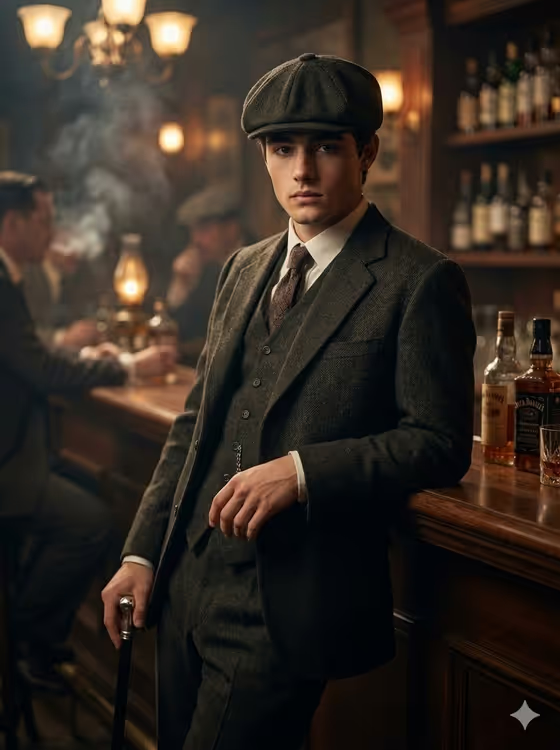
Smoky Bar Cane Portrait turns a photo of your subject into a single cinematic half-body portrait set in the 1920s. The result shows them in a tailored wool three-piece suit with a waistcoat, tie and flat cap, holding a vintage cane at a dim, smoky bar, with a direct gaze into the camera.
It suits anyone who wants a moody period-drama look: costume portraits, character art for a story or game, themed profile images, or a vintage-style gift. It makes one image in 3:4 format, not a grid or a set of pose variations.
What works best as input
- Use a clear, well-lit photo where the face is fully visible and in focus, since the template is built to keep the face faithful to your reference.
- A front-facing or slightly angled shot works best, as the final portrait has the head slightly lowered and the eyes locked on the camera.
- Pick a photo with only one person in it so the template knows exactly who the 'Portrait Person' is.
- In the 'Portrait Person' field you can add a short text description alongside or instead of a photo, for example 'the uploaded young man' or 'a composed vintage-style gentleman'.
- Avoid heavy filters, sunglasses or hats that hide the face, because the template adds its own flat cap and styling.
How to use it
- Open the Smoky Bar Cane Portrait template in Phosphene.
- In 'Portrait Person', upload your photo or describe the subject, for example 'the uploaded young man'.
- In 'Single Portrait Pose', type the stance you want, such as 'leaning on the bar with cane and locked gaze' (this field is text only).
- Generate the image, then check the face likeness, the suit details, the cane and the smoky bar lighting before saving or trying again.
Tips for a better result
- Try the pose examples as starting points, like 'three-quarter lean with cane held close' or 'quiet frontal stance beside the smoky bar', to get a different feel from the same subject.
- Keep the pose description short and physical. One clear stance reads better than a long list of actions.
- If you want a more dramatic mood, choose poses that suggest a lowered head and an intense stare, which matches the warm practical lights and deep shadows of the scene.
- Run the template with a few different pose phrases and compare, since each generation gives one portrait only.
Common mistakes
- Asking for several poses, a collage or a group in the pose field. The template is designed for one single portrait and will not produce a grid.
- Uploading a small, blurry or heavily shadowed photo, which makes it harder to keep the face accurate.
- Writing a pose that fights the setting, such as walking outdoors, when the scene is a smoky bar with a cane.
FAQ
Do I have to upload a photo?
The 'Portrait Person' field accepts a photo or a text description. For the closest likeness to a real person, upload a clear photo.
What size is the result?
The portrait is a single image in 3:4 aspect ratio, framed as a half-body shot.
Can I change the outfit or the setting?
The suit, waistcoat, tie, flat cap, cane and smoky bar are part of the fixed direction. You steer the result through the person and the pose fields.
Can I get multiple poses in one image?
No. The template creates one portrait at a time, so try different pose text and generate again to compare options.