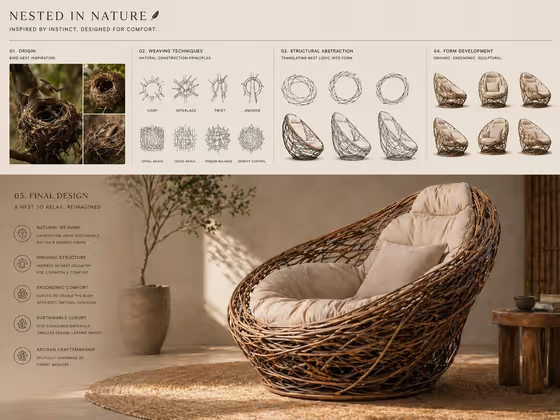
Nest-Inspired Lounge creates a single concept board that walks from bird-nest inspiration to a finished furniture render. The cover shows the full sequence: nest photography, weaving technique diagrams, structural abstraction sketches, form development studies, and a final rendered lounge chair in a styled room.
It suits industrial designers, furniture makers, students, and anyone pitching a product idea who wants a presentation-style board rather than one plain picture. You only describe the piece of furniture or product, and the template handles the board layout and the sketch-above, render-below structure.
What works best as input
- This template has no photo upload. The only field is Furniture design, a text field, so everything depends on what you write there.
- Name the object plainly, for example a sculptural lounge chair, since the same text is used for both the abstraction stages and the final product render.
- Add a short descriptor of the form you want, such as a rounded seat or a deep reclining shape, so the board has something specific to translate from the nest logic.
- Keep it to one object. The board is built around a single design, so listing several pieces tends to blur the sequence.
- If you pick a non-chair idea like a premium consumer product, expect the nest weaving language to be applied to that object instead.
How to use it
- Open the Nest-Inspired Lounge template in Phosphene.
- In the Furniture design field, type or choose what you want designed. The placeholder, a sculptural lounge chair, is a good starting point.
- Generate the board. The result is a 4:3 image with the inspiration and sketch stages above and the final render below.
- Review the board, check that the final render matches your idea, and adjust your wording in the field if you want a different piece or shape.
Tips for a better result
- Try one of the suggested examples, like a sculptural design object, to see how the nest weaving idea carries over to non-chair forms.
- Use material and shape words in the field, such as woven frame or rounded back, to nudge the final render without breaking the board layout.
- Run the same object with small wording changes and compare boards, since the sketches and render both shift with the description.
- Keep the description short and concrete. The template already supplies the earthy tones, natural fibers, soft cushioning, and warm lighting.
Common mistakes
- Describing a whole room or several items. The board is designed around one product, so extra objects compete with the main design.
- Writing a long, detailed paragraph. The field expects a short design name, and over-stuffed text can muddy the sketch-to-render progression.
- Expecting a photo of your own item to be used. This template is text-only and cannot take an uploaded picture, so describe the item in words instead.
FAQ
Do I need to upload a photo?
No. The template has a single text field called Furniture design and does not accept photo uploads.
What does the finished image look like?
A 4:3 concept board. The upper area shows nest inspiration, weaving diagrams, structural sketches, and form studies, and the lower area shows the final rendered design in a warm, natural setting.
Can I design something other than a chair?
Yes, you can describe other furniture or products in the Furniture design field. The nest-weaving theme and board layout stay the same, so results are most natural for woven or sculptural pieces.
Can I change the layout or materials?
The layout, earthy palette, natural fibers, and lighting are set by the template. Your control comes from how you describe the design in the one field.