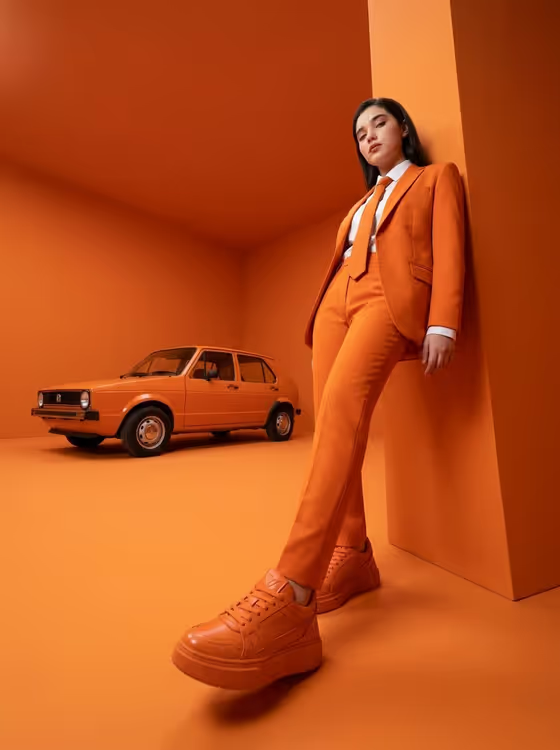
This template turns a reference portrait into a monochrome-orange fashion editorial. The subject wears a tailored orange suit, matching tie, white shirt and chunky orange sneakers, leaning against a geometric orange wall with one leg extended toward the camera, while a vintage orange hatchback sits parked behind.
It suits anyone who wants a bold, polished campaign-style image for a profile, a lookbook idea or a creative project. The look is built around one saturated color with sharp white accents, so the result reads as a styled studio shoot rather than a casual snapshot.
What works best as input
- Upload a clear photo of the face you want as the reference. The template uses the uploaded face as reference, so a sharp, evenly lit shot with the face fully visible gives it the most to work from.
- In the field labeled 'woman in my reference portrait subject', you can describe who the image is about or rely on your upload. The placeholder 'the woman in my reference' is a good starting point if you want the uploaded person to appear.
- Use a photo of yourself or someone who has agreed to be in the image, and avoid pictures of public figures.
- Pick a reference where the face is not covered by sunglasses, heavy shadows or a tight crop, so the likeness carries over cleanly.
How to use it
- Open the Orange Auto Editorial template in Phosphene.
- Upload your reference photo, or describe the subject in the 'woman in my reference portrait subject' field.
- Choose an option in the 'Pose and scene' field, such as an intimate close portrait, a full-body editorial frame or an environmental candid frame.
- Generate the image, then review it and adjust your subject description or framing choice if you want a different result.
Tips for a better result
- Try the 'full-body editorial frame' option if you want the extended leg, sneakers and car to stay visible, since the low-angle perspective is a big part of this look.
- Switch to 'intimate close portrait' when you care more about the face and the orange-and-white styling than the car.
- Keep your subject description short and specific. The fixed direction already handles the suit, wall, car and lighting, so you only need to say who the image is about.
- Generate a few times with different framing options and compare, since each one changes how much of the scene shows.
Common mistakes
- Uploading a small, blurry or heavily filtered photo, which gives the template a weak face reference.
- Writing long wardrobe or location details in the subject field. The orange suit, wall and hatchback are part of the template, so extra styling instructions can compete with them.
- Expecting a different color scheme. This template is built around a single orange palette with white accents.
FAQ
Do I have to upload a photo?
The subject field accepts either a text description or an uploaded reference. Uploading a photo is the way to have the portrait based on a specific face.
What does the 'Pose and scene' option change?
It sets how the shot is framed, with choices like an intimate close portrait, a full-body editorial frame or an environmental candid frame. The orange styling stays the same.
Will the vintage car always appear?
The car is part of the template's scene, but a tighter framing such as a close portrait may show less of it than a full-body frame.
Can I use someone else's photo?
Only use photos of yourself or people who have agreed to it, and avoid images of public figures.