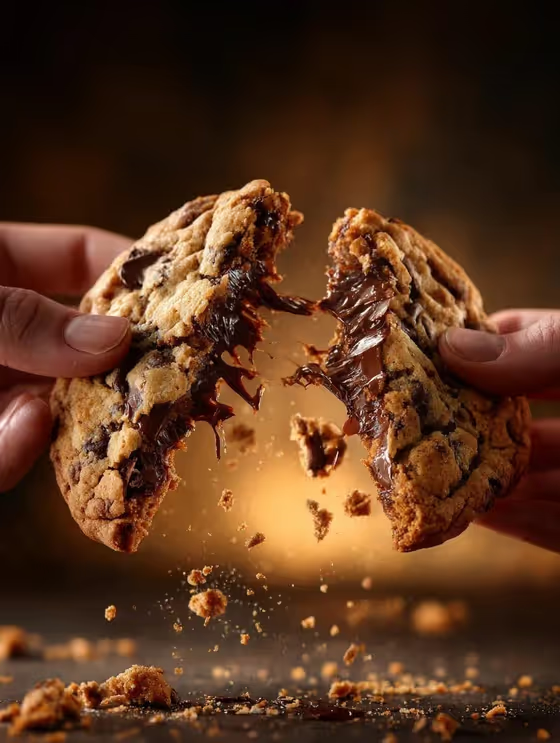
Pull-Apart Food Action turns a food item into a close-up, 3:4 image of two hands tearing it in half at the peak of the stretch. Crumbs hang in the air under warm, cozy light, and the focus stays on the crisp outer edges and the soft interior, like the chocolate chip cookie on the cover.
It suits anyone who needs an appetizing food shot without setting up a real pull: home bakers, small food sellers, menu designers, and social media creators. You name the food, pick the kind of stretch, and the template handles the framing, lighting, and falling crumbs.
What works best as input
- In the Pull-Apart Food Subject Product field, describe the food in plain words, such as a grilled cheese sandwich, a chocolate chip cookie, a cheese-filled pastry, or a gooey cinnamon roll.
- This field also accepts a reference photo. If you add one, choose a clear, well-lit picture of the food where its shape, crust, and color are easy to see.
- Add small descriptive details to the food, like how toasted the crust is or what the filling is, so the halves look like the food you have in mind.
- Pick foods that can realistically be torn apart and hold a soft interior. Dense or solid items give the stretch nothing to connect.
How to use it
- Open the Pull-Apart Food Action template in Phosphene.
- In Pull-Apart Food Subject Product, type the food you want to see pulled apart, or add a reference photo if you have one.
- Choose an option in Stretch Detail, such as long melted cheese strands, glossy chocolate stretch, sticky caramel pull, or soft cream filling ribbon.
- Generate the image, then check the result for the stretch, the hands, and the falling crumbs. Adjust your food description or stretch choice and run it again if needed.
Tips for a better result
- Match the stretch to the food. Melted cheese strands suit a grilled cheese sandwich, while a glossy chocolate stretch suits a cookie like the one on the cover.
- Mention the surface texture in your food description (crisp, flaky, toasted, sugar-dusted), since the template is built to keep crisp edges and a soft interior.
- Try the same food with different Stretch Detail options to compare how the connection between the halves changes the mood of the shot.
- Keep the food description short and concrete. One clear food with one clear stretch gives the frame a single focal point.
Common mistakes
- Describing several foods at once, which blurs what the hands are pulling apart. Stick to one item per image.
- Choosing a stretch that does not fit the food, such as cheese strands for a sweet pastry, which can make the result look odd.
- Using a dark, cluttered, or blurry reference photo, which gives the template little to work from for crust and texture.
FAQ
Do I have to upload a photo?
No. The food field accepts a text description, and you can also add a reference photo if you prefer. The Stretch Detail field is a choice from a list, not a photo.
What shape is the output?
The template makes a single image in a 3:4 portrait ratio, framed as a tight close-up on the food and the hands.
What can I choose for the stretch?
Stretch Detail offers options like long melted cheese strands, glossy chocolate stretch, sticky caramel pull, and soft cream filling ribbon.
Can it work for foods other than sandwiches?
Yes. The examples include a cookie, a cheese-filled pastry, and a cinnamon roll. Any food that can plausibly be pulled in two with a soft interior is a good fit.