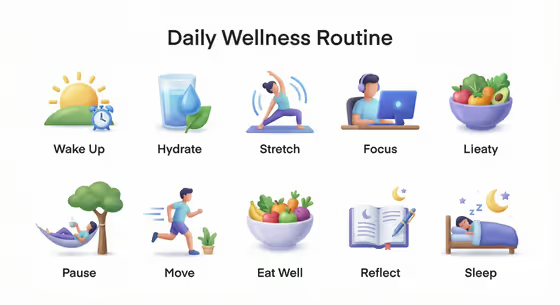
This template turns a routine into a labeled 3D icon set. Each step you list becomes its own friendly icon with a readable label, arranged in a clean grid under a centered routine title on a pure white background, as in the cover's Daily Wellness Routine sheet.
It works well for anyone who wants a quick visual summary of a habit or workflow, such as a skincare sequence, a work session, meal prep, or a bedtime wind-down. Everything is typed in, so there is no photo to upload.
What works best as input
- This template has no photo slot, so all the quality comes from your text. Be specific in Routine Icon Product Design, for example "a calming bedtime icon set" rather than just "bedtime".
- Keep Routine Name short and in capitals if you want a bold title, like MORNING SKINCARE or WIND DOWN.
- In Labeled Step List, give one concise name per step and separate them with semicolons, like "Cleanse; Tone; Treat; Moisturize; Protect; Refresh".
- Choose step names that are easy to picture as an object or scene. "Stretch" or "Journal" is easier to turn into an icon than something abstract.
- Keep the list to a size that fits a tidy grid. The cover shows ten steps, and the examples use six.
How to use it
- Open the Routine Step Icon Set template in Phosphene.
- Fill in Routine Icon Product Design with the routine and the icon family you want, or use one of the example ideas as a starting point.
- Type the centered title into Routine Name, then enter your steps in Labeled Step List, separated by semicolons.
- Generate the image, then check that every label is spelled correctly and each icon matches its step.
Tips for a better result
- Mirror the example phrasing in the first field, such as "a focused work-session icon set", so the icon family is clear from the start.
- Use short one or two word labels. Short labels are easier to render legibly under each icon.
- Try the same steps with a different routine description to explore alternate icon styles while keeping the white grid layout.
- If one icon is not right, rename that step to something more concrete and generate again.
Common mistakes
- Writing long sentences as step names. The template expects one concise name per step, and long text can crowd the labels.
- Forgetting the semicolons between steps, which can blur separate steps together.
- Leaving the first field vague, like "icons". Without the routine and icon family described, the set loses its theme.
FAQ
Do I need to upload a photo?
No. All three fields are text, and the template does not accept a photo in any of them.
How do I separate the steps?
Use semicolons between step names, like "Plan; Focus; Break; Focus Again; Review; Finish".
What does the Routine Name field do?
It sets the centered title shown above the icon grid, for example DEEP WORK or MEAL PREP.
What will the output look like?
A 3:4 image with a title on a pure white background and a grid of labeled 3D icons that share one consistent look, with smooth gradients and soft shadows.