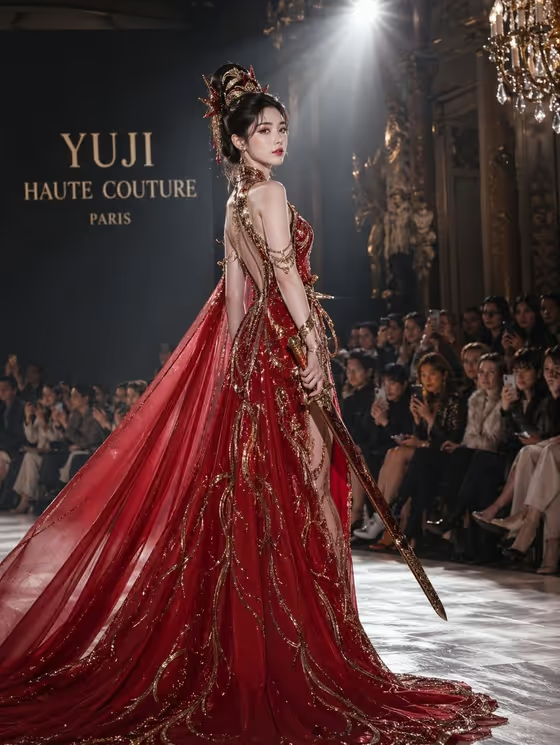
This template builds a Paris runway editorial in a portrait 3:4 frame. Your subject walks in a red couture gown, holds a ceremonial sword, and trails a long red train under one hard overhead spotlight while a dark audience fills the background.
It suits fashion mood boards, themed character art, campaign-style visuals, and anyone who wants a historical heroine presented as a high-fashion model rather than in costume. The direction keeps the subject an adult and aims for controlled dignity, with attention to silk and polished metal detail.
What works best as input
- For the Portrait character or heroine field, you can type a description or upload a matching reference photo. A clear, well-lit portrait gives the template something concrete to follow.
- Pick a photo with a visible face and shoulders, no heavy filters, and no other people in the frame, so the model knows exactly who the subject is.
- If you type instead, be specific about bearing and era, as in the examples: a poised classical Chinese heroine, a commanding warrior princess, or an elegant historical empress.
- Only use photos of yourself or people who have agreed to appear, and avoid using the likeness of public figures.
How to use it
- Open the Red Sword Couture Runway template in Phosphene.
- In Portrait character or heroine, type a short description or add your reference photo.
- Set the Couture gown option (the red high-fashion gown with long train is the default), then enter your Ceremonial sword in the text field, such as a slender jian sword.
- Generate the image, then check the gown, sword, train, and spotlight in the 3:4 result, and adjust your fields and run it again if needed.
Tips for a better result
- Change the sword description to shift the mood. An ornate gold-hilt sword reads richer and more ceremonial, while a minimal polished blade feels sleeker and more modern.
- Try the other gown options, such as crimson structured silk dress or scarlet draped runway gown, to change the silhouette while keeping the red palette.
- Add character cues to the heroine field, like warrior princess or historical empress, to push the pose and attitude toward commanding or regal.
- Keep each field to a short, concrete phrase. The template already supplies the runway, lighting, and audience, so your inputs only need to define who, what gown, and what sword.
Common mistakes
- Writing long scene descriptions in the heroine field. The Paris runway, spotlight, and shadowed audience are already fixed, so extra setting details can compete with them.
- Uploading a blurry, cropped, or group photo as the reference, which makes it harder to carry the subject over clearly.
- Leaving the sword field vague or empty. It is required, and a specific blade description gives a much clearer prop in the final image.
FAQ
Do I have to upload a photo?
No. The heroine field accepts either a typed description or a reference photo. The gown and sword fields are set by choosing or typing, not by uploading.
Can I change the gown color?
The template is built around a red couture gown, and its gown options all stay in the red family. Changing the style of the gown is the better way to vary the look.
What shape will the image be?
The output is a portrait image in a 3:4 aspect ratio.
Can I change the background or lighting?
Those are part of the template's fixed direction: a dark Paris runway with one hard overhead spotlight and a shadowed audience. Your inputs change the subject, gown, and sword.