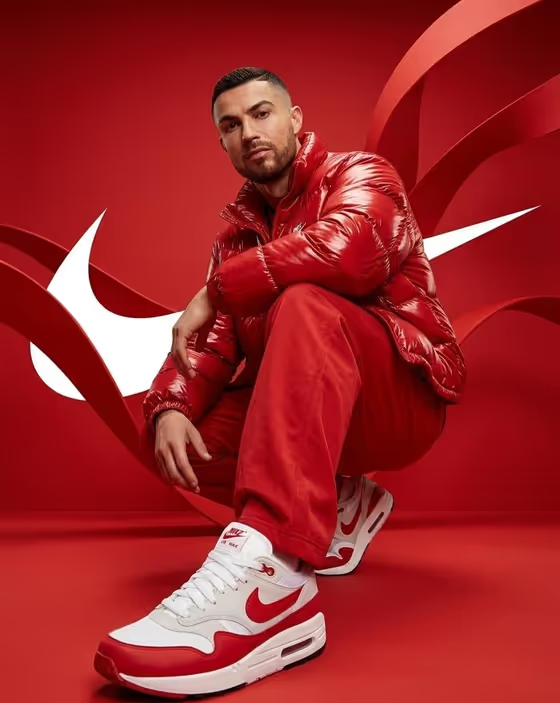
This template builds a red-studio streetwear campaign image. A person crouches low in a fully red space with sculptural red ribbons and white graphic shapes behind them, while one sneaker is pushed toward the camera with an ultra-wide, foreshortened look.
It suits sneaker sellers, streetwear brands, stylists, and creators who want a bold, single-color product shot without booking a studio. The output is a 16:9 image, so it fits banners, hero sections, and wide social placements.
What works best as input
- The upload requirement is 2 or more photos, so plan to add clear references for the subject and the outfit. For the 'Streetwear campaign subject' field, use a sharp, well-lit photo of the person with the face fully visible.
- Only use photos of people who have agreed to be featured. If you would rather not upload a face, describe the subject in words instead, for example 'a bold young athlete' or 'a charismatic music artist'.
- For 'Streetwear product outfit', either pick or type a monochrome look such as 'glossy red puffer with loose red pants', or add a styling reference photo. Keep the outfit and the sneaker clearly visible in the reference.
- If you add a sneaker or outfit photo, choose one with even lighting and the full shoe in frame so the footwear texture and white accents can carry over.
- 'Wide-angle pose' and 'White brand symbols' are text only, so keep them short and concrete, like 'low crouch with one sneaker forward' and 'large swooshes behind the model'.
How to use it
- Open the Red Puffer Sneaker Campaign template in Phosphene.
- Fill 'Streetwear campaign subject' with a description or a reference photo, then set 'Streetwear product outfit' with a chosen look or a styling reference.
- Type your 'Wide-angle pose' and 'White brand symbols' in the text fields, using the placeholder examples as a guide to the level of detail.
- Generate the image, then check the face, the nearest sneaker, the jacket folds, and the white graphics before deciding whether to run it again with adjusted fields.
Tips for a better result
- Keep the outfit in one color family. The template is built around a fully red studio where only the white shoes and white graphics contrast, so a matching look reads best.
- Try different poses from the examples, such as 'one-knee squat with an arm resting above' or 'deep side crouch with direct eye contact', to change the energy while keeping the forward sneaker.
- Swap the 'White brand symbols' for variations like 'bold stripes crossing the backdrop' or 'monogram arcs framing the subject' to give the same shot a different brand feel.
- Use a sneaker reference with clear white panels and visible texture so the closest shoe stays sharp and recognizable.
Common mistakes
- Using a small, dark, or angled face photo. A blurry reference makes it harder to keep the person's identity consistent in the final image.
- Describing an outfit in several colors. Mixing colors fights the monochrome red setup and weakens the white contrast.
- Writing a vague pose such as 'cool pose'. Without a clear crouch or sneaker direction, the foreshortened shoe-toward-lens look is less likely to come through.
FAQ
Do I have to upload photos?
The template asks for 2 or more photos, but the subject and outfit fields also accept descriptions. The pose and white symbols fields are text only.
Can I change the background color?
The direction is fixed to a saturated red studio with red ribbon forms, so this template is meant for red-on-red looks. Your inputs change the subject, outfit, pose, and white graphics.
What shape will the image be?
It is a 16:9 wide image.
Can I use any brand's logo as the white symbols?
You describe the white shapes in your own words, such as swooshes, stripes, or arcs. Make sure you have the right to use any brand mark you reference.