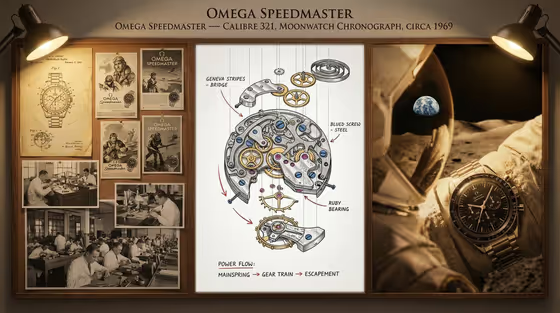
This template turns a single watch into a three-part atelier board. The left panel carries sepia patent drawings, vintage ads and workshop photographs, the center panel shows an exploded movement with labeled parts and a power-flow line, and the right panel shows the finished watch in a human setting. The cover example follows exactly that arc for a chronograph.
It suits watch enthusiasts, collectors, brand storytellers and designers who want a documentation-style poster rather than a plain product shot. You describe the timepiece, pick a historical context, and add a title and a complication with a year.
The board is built to look technically coherent, with a title block, callouts and annotated mechanical parts, so the more specific your inputs are, the more believable the result tends to read.
What works best as input
- In the Timepiece product field you can either type a description (for example "a hand-wound dress watch") or upload a reference photo of the watch you want featured. The example "my exact timepiece" signals the photo route.
- If you upload a photo, use a clear, well-lit shot of the dial and case from the front so details like hands, sub-dials and the bracelet or strap are easy to read.
- If you type instead, name the type of watch and one or two defining traits, such as "a vintage marine chronometer" or "a perpetual-calendar wristwatch", rather than a long list of features.
- Keep the Watch title short and in the style of a calibre or atelier name, like "NAVIGATOR CALIBRE 12" or "ATELIER NO. 7", since it is meant to appear as a heading on the board.
- For Complication and year, pair one complication with one year, such as "tourbillon · 1924" or "chronograph · 1973", so the movement and the archival panel stay consistent with each other.
How to use it
- Open the Watchmaker Documentation Board template in Phosphene.
- Fill in Timepiece product by typing a description or uploading a reference photo, then choose a Historical context such as atelier patent archive or collector museum record.
- Enter your Watch title and the Complication and year, using the examples as a guide for format.
- Generate the 3:4 image, then review all three panels: check that the title reads correctly, the movement callouts make sense for your complication, and the finished watch matches what you described.
Tips for a better result
- Match the Historical context to the story you want. Explorer expedition history suits a tool or field watch, while diplomatic pocket-watch provenance fits a more formal, classic piece.
- Make the complication and the year agree with your watch type. A minute repeater with a 1952 date reads as a coherent vintage object, which helps the archival sketches and the movement feel related.
- Try the same watch with different Historical context choices to get alternate boards from one product.
- If a first result misses on the watch itself, regenerate with a cleaner reference photo or a more specific product description.
Common mistakes
- Writing a long, crowded Watch title. It is meant to be a heading, so a short calibre-style name works better than a sentence.
- Giving a vague product such as "a watch" with no type or character, which leaves the hero timepiece and the movement design with little to anchor on.
- Mixing a complication and a year that conflict with the story you chose, which can make the archival panel and the finished watch feel mismatched.
FAQ
Do I have to upload a photo?
No. Only the Timepiece product field accepts a photo, and you can also just type a description of the watch. The other three fields are text or a choice.
What will the board look like?
It is a three-part layout: sepia archival drawings and history on the left, an exploded movement with power-flow annotations in the center, and the finished watch in a human context on the right.
Can I put my own watch on the board?
Yes, upload a reference photo of it in the Timepiece product field. A clear, front-facing shot gives the template the most to work with.
What goes in Complication and year?
One complication and one year in a short format, like "perpetual calendar · 1968" or "chronograph · 1973".