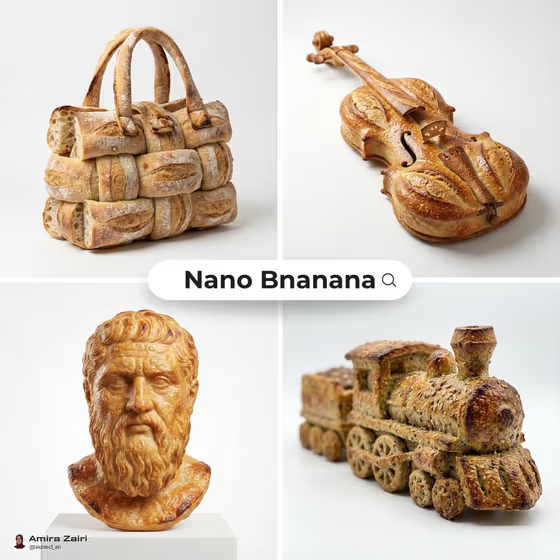
Bread Sculpture Studio turns an everyday object into a piece of edible design. You pick what to sculpt, choose a bread material, and add a baked detail, and the template rebuilds the object entirely from crust, crumb, and pastry layers on a clean neutral studio backdrop.
It suits food creatives, bakery and cafe owners, designers who like surreal product photography, and anyone who wants a fun image of a handbag, violin, or locomotive made of dough. The cover shows exactly that look: carved and braided loaves shaped into recognizable objects, lit like premium product shots.
What works best as input
- For the Sculpted object field, either type a short description (the placeholder is "a vintage camera") or upload a reference photo of the object you want rebuilt in bread.
- If you upload a photo, pick one with a single object, a clear outline, and plain lighting. The template keeps the silhouette and functional details, so a readable shape gives a better sculpture.
- If you type instead, be specific about the object: "a small handbag" or "a running shoe" gives a clearer target than something broad like "a bag" or "footwear".
- Bread material and Baked detail are text and choice fields only, so describe them in words. Photos are not accepted there.
- Objects with distinct parts, like handles, wheels, straps, or a scroll, give the bread more places to show braiding, scoring, and layered crust.
How to use it
- Open Bread Sculpture Studio in Phosphene and start a new generation.
- In Sculpted object, type what you want to turn into bread or upload a reference photo of it.
- Set Bread material (for example flaky croissant dough, seeded sourdough, glossy brioche, or layered puff pastry) and write a Baked detail such as sesame crust and airy pockets.
- Generate the image, then review the 3:4 result for silhouette, crust texture, and shadow. Adjust the fields and run it again if you want a different look.
Tips for a better result
- Match the material to the object. A violin or locomotive often suits seeded sourdough, while a handbag can look good in braided, layered dough like the cover example.
- Use the Baked detail field for surface character: poppy seeds and blistered edges reads rustic, while buttery layers and glaze reads polished.
- Run the same object with different bread materials to compare. Puff pastry gives fine flaky layers, brioche gives a smoother glossy surface.
- Keep each field short and concrete. The template already handles the studio lighting and background, so spend your words on the object and the bread.
Common mistakes
- Choosing an object with no clear shape or too many items at once. The sculpture works best with one recognizable object.
- Writing a long scene in the object field. The backdrop is fixed to a neutral studio, and no text, logos, or watermark will be added.
- Leaving the baked detail vague or contradicting the material, such as asking for glossy glaze on a dry rustic crust, which can muddy the texture.
FAQ
Do I have to upload a photo?
No. The Sculpted object field accepts either a typed description or an uploaded reference, so you can work from text alone.
Will my object still look like itself?
The template is set to preserve the object's silhouette and functional details while rebuilding every visible part from bread, so it should stay recognizable.
Can I change the background?
The direction is fixed to a clean neutral studio backdrop with soft highlights and a gentle contact shadow, so the focus stays on the bread texture.
What shape is the output?
It generates a single image in a 3:4 aspect ratio.