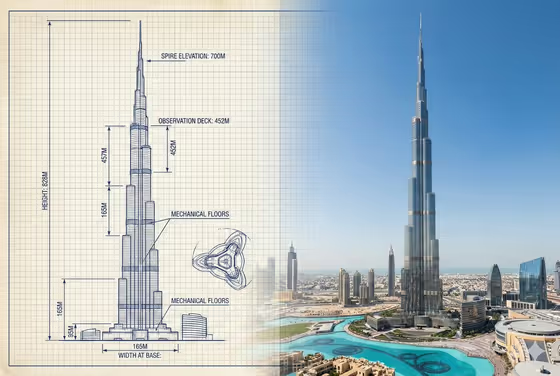
This template builds a single side-by-side plate for a building you name. The left half is a metric engineering sketch with dimension lines and labels, and the right half is a full real-world photograph of the same structure, blended together like the cover image of the Burj Khalifa.
It suits architecture students, designers, educators, and anyone who wants a quick visual that explains how a tower is shaped. You only fill in three text-based fields, so there is nothing to upload.
What works best as input
- This template has no photo slot, so everything comes from your words. Be specific in the Architectural product name field, such as Burj Khalifa, Empire State Building, or The Shard, so the sketch and the photo describe the same structure.
- Pick a Technical drawing focus that matches what makes the building recognizable, for example tiered setbacks and total height for a stepped tower or facade modules and widths for a repeating glass skin.
- In Photo atmosphere, write a short lighting or weather phrase like clear blue daylight, golden-hour city light, soft overcast skyline, or dramatic dusk illumination.
- Stick to one building and one mood per plate. Mixing several buildings or conflicting lighting in a single field makes it harder for both halves to agree.
How to use it
- Open the Burj Khalifa Sketch to Photograph template in Phosphene.
- Type the building into Architectural product name, then choose or write your Technical drawing focus.
- Enter your Photo atmosphere, then generate the 3:2 image.
- Review the result: check that the sketch silhouette lines up with the photographed tower and that the labels are readable. Adjust a field and generate again if needed.
Tips for a better result
- Change only one field between runs. Keeping the building fixed while you swap the Photo atmosphere is an easy way to compare golden-hour light against dusk.
- Try different drawing focuses on the same building, such as structural core and floor zones versus front and side elevations, to get plates that explain different things.
- Choose famous, distinctive structures with clear silhouettes. The sketch and photo are meant to match in tier sequence and scale, and recognizable shapes make that easier to judge.
- Use short, concrete lighting phrases rather than long scene descriptions, since the photo half is only one part of the plate.
Common mistakes
- Using a vague building name like a tall tower. Without a specific structure, the plate can end up showing a generic building instead of one the sketch really explains.
- Picking a drawing focus that does not suit the building, such as facade modules for a smooth, unbroken form, which can lead to a less meaningful sketch.
- Overloading Photo atmosphere with many conditions at once, for example combining midday sun, fog, and night lights, which makes the photo half inconsistent.
FAQ
Do I need to upload a photo?
No. All three fields are text or choice inputs, and the template does not take a photo upload.
Can I use a building other than the Burj Khalifa?
Yes. The examples include the Empire State Building and The Shard, and you can describe another structure in the Architectural product name field.
What does the final image look like?
It is a 3:2 side-by-side plate with the metric engineering sketch and labels on the left and a matching photograph of the same tower on the right.
How do I change the mood of the photo?
Edit the Photo atmosphere field, for example from clear blue daylight to dramatic dusk illumination, and generate again.