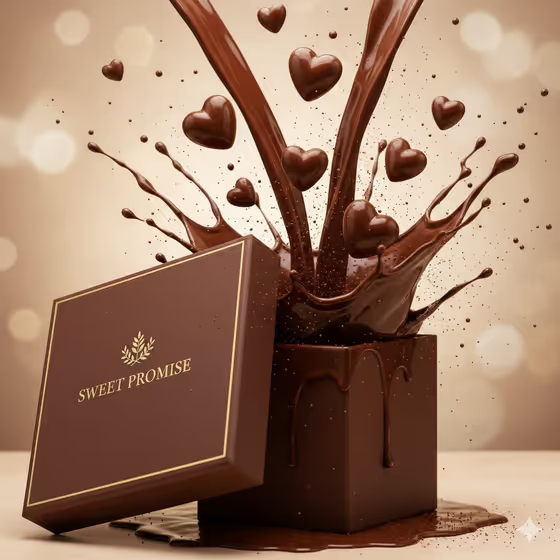
Chocolate Promise Reveal turns a chocolate box or gift product into a luxury reveal in warm mocha and gold. The cover shows the idea well: a brown box with its lid tipped aside, molten chocolate surging upward, and small heart-shaped pieces floating in the air over a soft, glowing background.
It suits chocolatiers, gift brands, and anyone preparing a Valentine's or special-occasion promotion who wants a polished product visual without a studio shoot. You name the product, pick the reveal motion, and set the title that appears on the box lid.
What works best as input
- For the Chocolate product or gift box field, you can either type a description or upload a matching reference photo. Short, concrete phrases like the field's examples (espresso-brown luxury chocolate box, ruby-red truffle case) work well.
- If you upload a photo, use a clear shot of the box or product on a plain background so its shape and color are easy to read.
- Describe color and material when typing: espresso brown, ivory, ruby red, matte or glossy. The scene is built around a warm mocha-gold palette, so colors that sit well in that range tend to blend in naturally.
- Keep the Gift-box title short, in capitals, like SWEET PROMISE or MIDNIGHT TRUFFLES. It is meant to appear as embossed serif lettering on the lid, so fewer words stay more legible.
- Use your own brand or product name in the title field if you want the box to carry it, as the examples suggest with MY CHOCOLATE NAME.
How to use it
- Open the Chocolate Promise Reveal template in Phosphene.
- Fill in Chocolate product or gift box with a short description, or add a reference photo of your box.
- Choose a Reveal motion, such as lid lift with molten burst, box rotation into heart orbit, or slow ribbon splash and cocoa bloom, then enter your Gift-box title.
- Generate, then review the result. Check that the lid lettering reads correctly and the box matches what you described, and adjust the fields if you want a different look.
Tips for a better result
- Try each Reveal motion with the same box and title to compare how the molten surge, heart orbit, and ribbon splash change the mood.
- Swap the product description between examples like ruby-red truffle case and ivory praline collection to see how the palette shifts while the luxury lighting stays consistent.
- Choose a title with a similar letter count to the example (SWEET PROMISE, GOLDEN INDULGENCE) so the embossed lettering sits comfortably on the lid.
- If a first result is close but not right, change one field at a time so you can see which input made the difference.
Common mistakes
- Writing a long sentence in the title field. A short, bold title fits the embossed lid far better than a tagline.
- Describing the product too vaguely, such as just 'chocolate'. Without a color or style, the box has little to anchor on.
- Uploading a cluttered or heavily angled photo as the reference, which makes the product harder to match.
FAQ
Can I upload my own photo?
Yes, but only in the Chocolate product or gift box field, which accepts a matching reference photo. The Reveal motion and Gift-box title fields are not photo inputs.
What goes in the Gift-box title field?
A short title for the lid, like SWEET PROMISE or MIDNIGHT TRUFFLES. You can also enter your own chocolate name.
What do the reveal motion options do?
They set how the scene unfolds. The examples include lid lift with molten burst, box rotation into heart orbit, and slow ribbon splash and cocoa bloom.
What kind of look should I expect?
A warm, luxurious style in mocha and gold with molten chocolate, glossy highlights, floating heart-shaped pieces, and a soft glowing backdrop, as in the cover image.