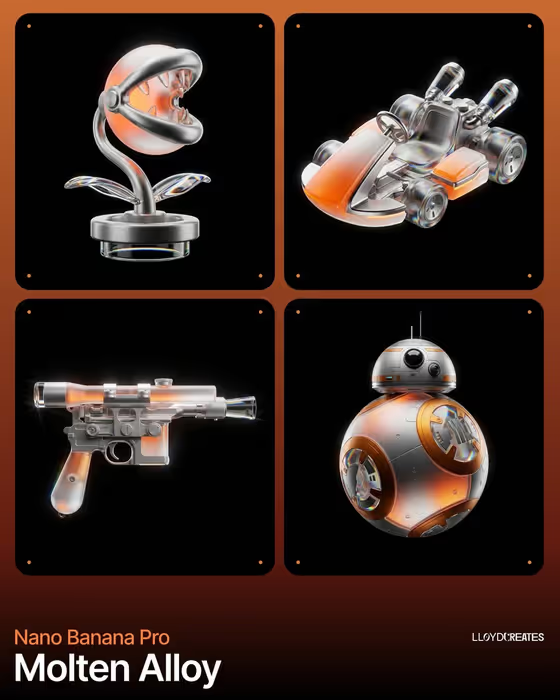
This template turns a single tech product into a levitating hero shot: one object floating in a black void, with a light glow inside its translucent parts and colored light splitting along its edges. The cover shows how the look works, with glassy, metallic objects lit from above against pure black.
It suits anyone who wants a dramatic, studio-style product visual without building a render scene. Product designers, hardware makers, and creators mocking up concepts can use it by describing a product or uploading a reference of it.
What works best as input
- In the Tech product object field, either describe the product in a few words (for example, a compact smart speaker) or upload a reference photo of the real item.
- If you upload a reference, pick a clear shot of the whole product with its full outline visible, since the template keeps one fully visible product centered.
- Choose a reference with simple, readable geometry. Clean silhouettes and distinct parts such as buttons, dials, or lens areas carry through better than cluttered shots.
- If you describe instead of upload, name the shape and type of device, such as a sculptural desk controller or a precision wearable device, rather than a vague word like gadget.
- Avoid references that show several products, hands, or a busy scene, because the result is meant to feature one product alone.
How to use it
- Open the Prismatic Levitating Tech Product template in Phosphene.
- Fill in the Tech product object field by typing a description or uploading a reference of your product.
- Set the Primary material system, Internal glow color, and Prismatic light effect from the options, or use the example values as a starting point.
- Generate the image, then review the 3:4 result and adjust any field if the material, glow, or edge light is not what you wanted.
Tips for a better result
- Pair contrasting materials, such as clear optical glass with dark alloy, to give the light more surfaces to play across.
- Match the glow to your product's mood. Orange fading to white feels warm like the cover, while electric blue or violet fading to cyan reads cooler and more technical.
- Use restrained glass refraction or a fine chromatic fringe for a subtle look, and spectral rainbow edges for a bolder one.
- Change only one field at a time between generations so you can see exactly what each choice does.
Common mistakes
- Describing more than one product or adding scene elements. The template is built around a single levitating object with no floor, props, hands, or text.
- Using a cluttered or cropped reference photo, which makes it harder to keep the whole product visible and centered.
- Picking a material and glow that fight each other, such as an opaque finish with an internal glow, since the glow needs translucent sections to show through.
FAQ
Do I have to upload a photo?
No. The Tech product object field accepts either a typed description or an uploaded reference, so you can use whichever you have.
Can I add a background or a surface for the product to sit on?
No. The template keeps the product alone in a black void with no floor, supports, or props.
Can I put text or a logo on the image?
The template is set to produce no text or watermarks, so plan to add any labeling afterward.
What shape is the output?
The image is made in a 3:4 portrait format.