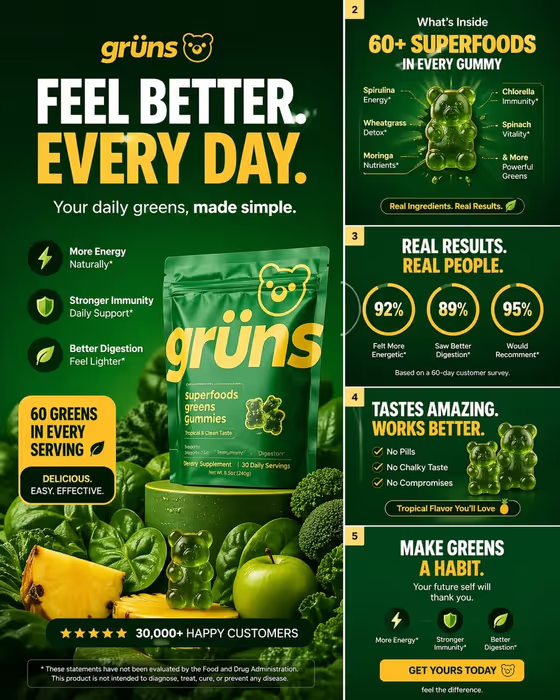
Gummies Carousel Ad makes a feed-ready carousel cover for a gummy supplement brand. It builds one bold headline, one clear wellness benefit and a clean product hero into a 3:4 image, with high contrast so the type stays readable at feed size.
It suits small brands, DTC sellers and marketers who need a first slide that stops the scroll without a design brief. The example cover shows the general direction: a dark green field, a large headline, a short benefit list and the product pack surrounded by its ingredients.
What works best as input
- In the Gummy brand or product field, you can pick or describe your product, and it also accepts a photo. A clear, well-lit shot of your actual pack or gummies gives the template something real to build the hero around.
- Choose a photo where the product is sharp, centered and not cropped at the edges. Busy backgrounds and heavy shadows make it harder to separate the product cleanly.
- If you describe instead of upload, be specific about what the product is, such as a greens gummy supplement. Vague wording gives the template more room to guess.
- For the Carousel headline, write something short enough to read at a glance. The examples, like Daily Greens, Finally Easy or Feel Better in One Bite, show the right length.
How to use it
- Open the Gummies Carousel Ad template in Phosphene.
- Fill in Gummy brand or product by describing it or adding a photo of your product, then type your Carousel headline.
- Generate the image and wait for the 3:4 cover to appear.
- Review the result at small size, check the headline and benefit are easy to read, and adjust your inputs if you want another version.
Tips for a better result
- Keep the headline to one idea. The template is built around a single wellness outcome, so a focused hook lines up better than a list of claims.
- Try the example headlines as a starting point, then rewrite them in your own brand voice and compare the covers side by side.
- Use a clean product photo with the label facing the camera so the brand name on the pack stays legible in the hero.
- View the result at phone size before using it. If the type feels crowded, shorten the headline and generate again.
Common mistakes
- Writing a long, multi-part headline. At feed scale it becomes hard to read and weakens the one-benefit focus.
- Using a dark, blurry or heavily cropped product photo, which makes the pack and label less clear in the final cover.
- Describing the product too loosely, so the hero does not match what you actually sell.
FAQ
Do I have to upload a photo?
The Gummy brand or product field accepts a photo, but you can also describe the product in text. The Carousel headline is text only.
What size is the image?
The cover is generated in a 3:4 aspect ratio, suited to mobile feeds.
Can I choose the wellness benefit?
The template leads with one clear wellness outcome. You steer it mainly through your headline and how you describe your product.
Will the cover include health claims I can use as-is?
Treat the generated text as a draft. Check any wording on the image against the rules for your product and market before you publish.