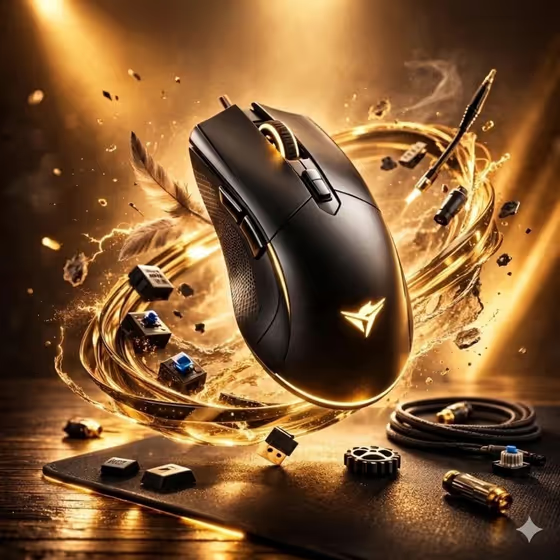
This template turns a gaming or tech device into a levitating hero shot in a 3:4 image. Your product floats just above a desk while a halo of related components, such as switches, cables and small parts, orbits around it with sparks and motion particles. The cover shows a black gaming mouse with a golden swirl, which is the look the default effect aims for.
It suits sellers, small brands, reviewers and gamers who want a dramatic ad-style visual without a studio shoot. The product silhouette, controls, materials and scale are meant to stay readable, so the device remains the focus.
What works best as input
- In the Tech product or device field you can either type a description or upload the exact product reference. If you want your specific model to appear, a reference photo is the safer choice.
- Use a clear, well-lit photo of the whole device, with the shape, buttons and logo visible and not cut off.
- If you describe instead, be specific about the type and style, for example 'premium gaming mouse' or 'wireless mechanical keyboard'.
- Choose a reference where the product is the only main subject, so the template can place it cleanly above the desk and arrange components around it.
How to use it
- Open the Levitating Tech Energy Ad template in Phosphene.
- In Tech product or device, describe your device or upload your product reference photo.
- Pick an option for Energy effect, such as golden orbital rings and sparks, electric blue arcs and particles, magenta data ribbons and lens flares, or white magnetic waves and floating dust.
- Generate the image, then check that the product shape and details look right and that the orbiting components do not cover it.
Tips for a better result
- Match the energy effect to your product's colors. A black device with gold accents suits the golden rings, while cooler hardware may pair well with electric blue or white magnetic waves.
- Try the same product with each Energy effect to build a set of ad variations with a consistent layout.
- Name the exact device type in your description so the orbiting components feel related, like switches and cables around a mouse or keyboard.
- If a first result changes details of your product, try again with a cleaner, more direct reference photo.
Common mistakes
- Using a cluttered or low-resolution reference photo, which makes it harder for the product shape and controls to stay accurate.
- Writing a vague description such as 'gadget' instead of naming the device, which gives the template less to build the component halo from.
- Choosing an energy effect that clashes with the product colors, so the glow competes with the device instead of framing it.
FAQ
Do I have to upload a photo?
No. The Tech product or device field accepts either a typed description or an uploaded product reference. Uploading is better when you want your exact product.
What kinds of devices work?
The examples include a gaming mouse, a wireless mechanical keyboard and a compact gaming controller, and you can also use your own product reference.
Can I change the look of the glow and sparks?
Yes. The Energy effect field lets you choose options like golden orbital rings, electric blue arcs, magenta data ribbons or white magnetic waves.
What format is the result?
The template makes a single image in a 3:4 aspect ratio, with the device levitating above a desk.