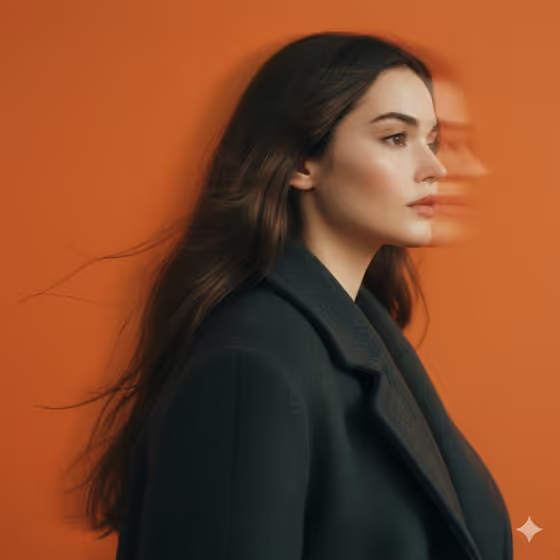
Orange Motion Portrait makes a tight, vertical side-profile portrait against a flat, saturated orange studio backdrop. The subject wears a matte charcoal wool coat, and the edges of the hair and jaw trail sideways as if the camera panned during a slow shutter, while the center of the face stays readable.
It suits anyone who wants an editorial, film-like portrait with a sense of movement: profile pictures, mood boards, lookbook-style images or creative self-portraits. You can describe a subject in words or point the template at a portrait you upload.
What works best as input
- In the Portrait person or subject field you can either describe the person or upload a matching reference. Short descriptions like the examples (a mysterious adult woman, an introspective adult man, an androgynous fashion figure) show the level of detail that fits.
- If you upload a portrait, pick one with a clear view of the face. Because the final image is a side profile, a photo where the head is already turned or the jawline and nose are easy to see gives the template more to work with.
- Use a photo of yourself or someone who has agreed to be used. Keep it to one person, since the template is built around a single subject in the frame.
- Good, even lighting on the reference helps the face stay recognizable once the blur is added around the edges.
How to use it
- Open the Orange Motion Portrait template in Phosphene.
- In Portrait person or subject, type a short description of who the portrait is of, or upload a matching reference photo.
- Choose a value for Panning motion, such as subtle edge smear, soft hair and jaw streaks, pronounced horizontal trail or ghosted profile motion.
- Generate the image, then review the 3:4 result and adjust the subject or motion choice if the face or blur is not what you wanted.
Tips for a better result
- Start with subtle edge smear if you want the face and coat to stay crisp, and move to pronounced horizontal trail when you want the movement to be the main feature.
- Try ghosted profile motion for the dramatic double-exposure look of a trailing second profile, like the one beside the face in the cover image.
- Vary the subject description rather than the setup. The orange backdrop, charcoal coat and soft studio light are fixed, so changing who the portrait shows is the quickest way to get a different image.
- Generate the same subject with two different Panning motion options and compare, since the amount of blur changes the mood a lot.
Common mistakes
- Describing a busy scene, a different outfit or a new background in the subject field. The template fixes the orange studio backdrop and charcoal wool, so those details will not carry over.
- Uploading a photo where the face is small, turned away or hidden by sunglasses or hair, which leaves little facial structure to keep recognizable.
- Picking the strongest motion option by default. A heavy trail can overwhelm the face, so match the blur level to how recognizable you need the person to be.
FAQ
Do I have to upload a photo?
No. The Portrait person or subject field accepts a written description, and it also accepts a matching reference photo if you prefer to upload one.
What does the Panning motion option change?
It controls how the blur appears, from a subtle edge smear to soft hair and jaw streaks, a pronounced horizontal trail or a ghosted profile. The face stays near the center while the edges carry the movement.
Can I change the background color or the coat?
Not through this template. It is set up for a charcoal wool coat against a saturated orange studio background, so those parts stay the same.
What shape is the image?
The output is a still image in a 3:4 vertical format, framed as a tight side-profile portrait.