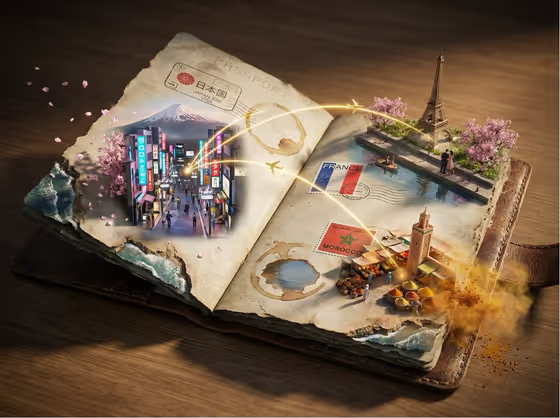
Passport Stamps Portal World turns an open, weathered passport into a small 3D world. Visa stamps on the pages become portals, and miniature destination scenes rise out of them, linked by glowing golden flight paths. In the cover example, a neon city street with a mountain behind it, a tower with blossoms, and a spice market all grow out of separate stamps and ink marks.
It suits anyone who wants a travel-themed image built around a place that matters to them: a trip recap, a postcard-style post, a gift idea, or a themed header. You pick the scene subject and a creative direction, and the template handles the passport setting, the scale play and the paper details such as coffee-ring lakes and worn edges that erode into coastlines.
What works best as input
- The Scene subject or object field accepts a photo or a description. A clear photo of a landmark, street or place gives the template something concrete to preserve.
- Choose a photo where the main subject is easy to read: good light, little clutter, and the landmark or scene fully in frame rather than cropped at the edges.
- If you type instead, be specific. 'A lively neighborhood scene' or 'a cultural destination' works better when you add what makes it recognizable, such as a market, a tower or a lit-up street.
- Keep to one clear subject or theme. The template repeats your choice across several stamps, so a focused idea reads better than a long list.
How to use it
- Open the Passport Stamps Portal World template in Phosphene.
- In Scene subject or object, add your photo or describe the place or object you want to rise from the stamps.
- Set Creative direction to one of the options, such as Clean editorial, Cinematic dramatic, Playful colorful or Quiet premium.
- Generate the image, then review the 3:4 result. If the mood or subject is off, adjust the fields and run it again.
Tips for a better result
- Match the direction to the feeling you want. Cinematic dramatic suits moody, high-contrast scenes, while Playful colorful suits bright, lively destinations.
- Try the same subject with two or three different directions to compare how the lighting and mood change.
- Pick a subject with strong visual identity, like a skyline, a market or a landmark, so each miniature scene looks distinct on the page.
- Use a personally meaningful place for a more individual result, such as a hometown street or a favorite trip.
Common mistakes
- Using a dark, blurry or heavily cropped photo, which gives the template little to preserve in the miniature scenes.
- Writing a vague subject like 'a place', which leaves the portals generic. Name the landmark, scene or setting.
- Packing several unrelated subjects into one field, which can make the scenes feel crowded instead of cohesive.
FAQ
Do I have to upload a photo?
The Scene subject or object field accepts a photo, and it also takes a typed description. Use whichever fits your idea.
What does Creative direction change?
It sets the overall mood of the image. The options include Clean editorial, Cinematic dramatic, Playful colorful and Quiet premium.
What format is the result?
The template produces a single image in a 3:4 aspect ratio.
What will appear in the image besides my subject?
An open weathered passport with stamps that become miniature scenes, golden flight paths between them, and paper details like coffee-stain lakes and worn edges that turn into coastlines.