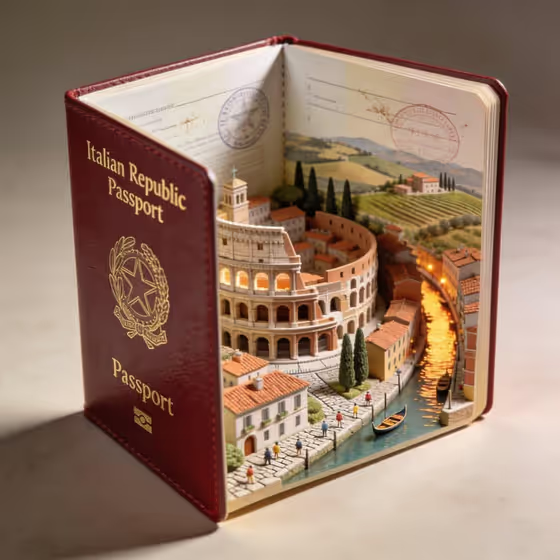
Passport World Rising turns a country into a tabletop miniature. You name a country, pick the landmarks, and the template builds a hyper-real open leather passport with temples, skylines, terrain and tiny people rising out of its stamped pages. It is made for travel posts, trip announcements, souvenir-style art and anyone who wants a country shown as a collectible object.
The output is a 3:4 image. The passport stays the base of the scene: leather cover, gold-embossed text, paper fibers and stamps, all lit softly with shallow depth. The cover example shows an Italian passport with a Colosseum, canal and hillside vineyards emerging from the pages.
What works best as input
- Country name is a text field. Write one clear country, like Japan, Italy or Morocco, so the passport and the landmarks agree with each other.
- Landmark collection accepts either a description or a reference photo. A short list of three or so named features works well, such as temples, skyline and Mount Fuji, or colosseum, canals and coast.
- If you upload a reference photo for the landmarks, pick one that clearly shows the architecture or landscape you want, rather than a crowded or heavily filtered shot.
- Official passport name is the text that gets embossed in gold on the cover. Type it exactly as you want it to read, in capitals if you like, for example PASSPORT OF JAPAN or REPUBBLICA ITALIANA.
- Keep the three fields consistent. A cover title in the country's own language can look authentic, but make sure it matches the country you named.
How to use it
- Open the Passport World Rising template in Phosphene.
- Fill in Country name, then set the Landmark collection by typing a description or adding a reference photo, and enter the Official passport name for the cover.
- Generate the image and wait for the 3:4 result to finish.
- Review the cover lettering, the landmarks and the passport details, then adjust a field and generate again if something is off.
Tips for a better result
- Mix geography types in the landmark field, such as a historic building, water and hills, so the pages show varied layers like the canal and vineyards in the example.
- Try the suggested examples as a starting point (Japan, Italy, Morocco), then swap in a country of your own to compare results.
- Use the official passport name field to change the mood. A formal title like KINGDOM OF MOROCCO reads differently from a generic OFFICIAL PASSPORT.
- Keep landmark lists short and specific. Three well-chosen features usually read more clearly than a long list.
Common mistakes
- Writing a long, vague landmark list such as everything famous about the country, which gives the scene no clear focus.
- Entering a passport name that does not match the country, which makes the cover and the miniature world disagree.
- Uploading a cluttered or low-quality reference for the landmarks, so the key architecture is hard to read.
FAQ
Do I have to upload a photo?
Only the Landmark collection field accepts a photo, and you can also just describe the landmarks in text. Country name and Official passport name are text fields.
What can I put on the passport cover?
Whatever you type in Official passport name, such as PASSPORT OF JAPAN or OFFICIAL PASSPORT. It is rendered as gold-embossed text on the leather cover.
What shape is the result?
The output is a single image in a 3:4 aspect ratio.
Can I use a country not in the examples?
Yes. The examples are only suggestions, and the Country name field is open text, so you can enter the country you want.