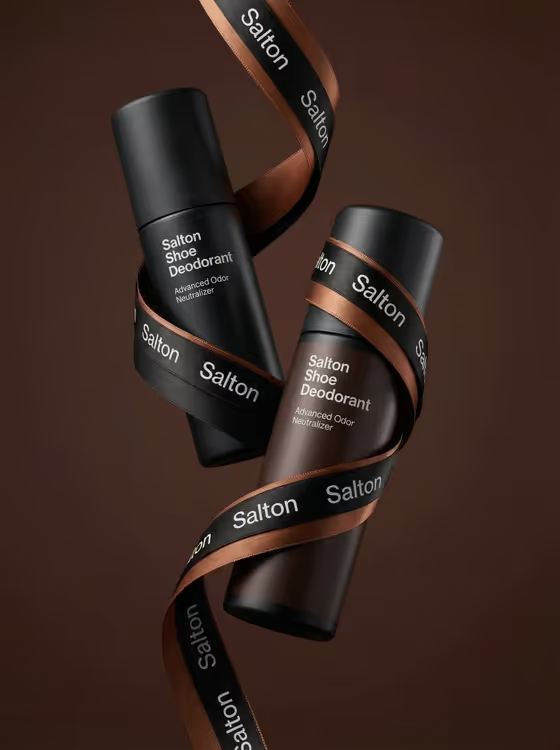
Ribboned Bottle Pair makes a polished product photograph of two matching bottles tied together by a single flowing satin ribbon. The bottles tilt on a diagonal, one in front and one behind, against a solid warm backdrop such as chocolate or terracotta. The output is a 3:4 portrait image.
It suits shoe-care and similar product brands that want a clean, editorial hero shot without a studio setup. If you sell sprays, canisters or bottled care products and want a gift-ready, branded look, this template gives you a ready-to-use visual to start from.
What works best as input
- In the Shoe-Care Product field you can either describe the item or add a photo as an exact visual reference. A clear photo helps the bottles match your real packaging.
- If you upload a photo, pick one with the product front-facing, evenly lit and uncluttered, so the label and shape are easy to read.
- If you describe instead, name the product type and finish, as in the examples: two matte shoe-deodorant bottles, two suede-protector bottles, or two leather-care canisters.
- Keep the description to one product style. The template pairs two matching items, so avoid mixing different products in one entry.
How to use it
- Open the Ribboned Bottle Pair template in Phosphene.
- Fill in Shoe-Care Product by describing your bottles or adding a reference photo of the product.
- Fill in Ribbon Treatment with a text description of the ribbon colors and material, for example black and brown branded satin.
- Generate the image, then check that the ribbon wraps the bottles naturally and the packaging stays readable before saving it.
Tips for a better result
- Pick a ribbon palette that complements your packaging. The cover pairs black and copper-brown satin with dark matte bottles on a chocolate background.
- Try the other ribbon ideas in the examples, such as charcoal and gold woven ribbon or burgundy and black grosgrain, to get different moods from the same product.
- Mention the ribbon material (satin, woven, grosgrain) since it changes how the ribbon catches light and folds.
- Run the template a few times with small wording changes and compare, since ribbon flow and bottle angle can vary between results.
Common mistakes
- Describing too many products or mixing packaging types in the Shoe-Care Product field, which makes the matching pair harder to read.
- Using a busy or dark reference photo where the label is hard to see, so the bottle details come out less accurate.
- Writing a long ribbon description with several competing colors. A simple two-tone treatment tends to stay cleaner and legible.
FAQ
Do I have to upload a photo?
No. The Shoe-Care Product field accepts a text description, and you can also add a photo as a visual reference. The Ribbon Treatment field is text only.
Can I use it for products other than shoe care?
The slot and examples focus on shoe-care items, but the setup is two matching tall bottles or canisters tied with ribbon, so describe your product clearly and see how it renders.
Will the ribbon show my brand name?
The template aims to repeat the brand evenly along the ribbon while keeping it legible. You can mention a branded ribbon in Ribbon Treatment, as in the black and brown branded satin example.
What size is the image?
The output is a single image in a 3:4 portrait ratio.