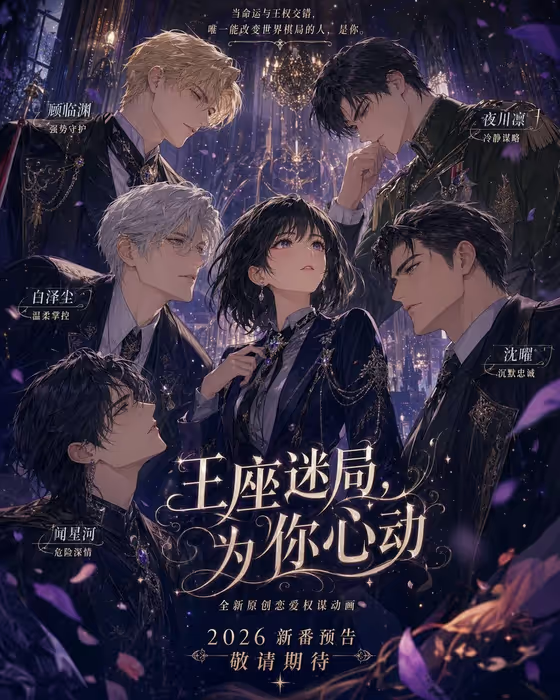
Royal Romance Key Art turns your idea or reference into a vertical romance-game poster. The heroine sits at the center while several romantic leads lean in from different angles, in a polished illustrated style with rich costumes, soft bloom, drifting petals and a dark, ornate palace mood, much like the cover.
It suits writers, game and story creators, and fans who want a promo-style poster for an original heroine or a personal campaign concept. The output is a 3:4 image, so it works well as a key visual with space for a title and character labels.
What works best as input
- In the subject field, you can describe your heroine in text or upload a photo as her visual reference. Pick whichever matches what you have.
- If you upload a photo, choose a clear, well-lit image of the one person or character you want at the center. A clean view of the face helps the poster keep her recognizable.
- If you type instead, name the heroine's defining traits, such as hair, outfit mood and personality. The template already frames her as intelligent and composed, so add details that make her yours.
- Use only your own character, your own likeness, or a reference you have the right to use. Do not describe real public figures.
- Keep the subject field focused on one central heroine. The surrounding leads are handled by the template, so you do not need to list them.
How to use it
- Open the Royal Romance Key Art template in Phosphene.
- In the subject field, describe your heroine or upload your visual reference. The placeholder 'a heroine surrounded by powerful romantic leads' shows the kind of phrasing that works.
- Choose a Poster layout, such as 'single hero with title', 'modular editorial grid' or 'layered cinematic collage'. The default frames vertical key art around your content.
- Generate the poster, then review the 3:4 result for the heroine's placement, the leads' angles and the overall mood. Adjust your description or layout and run it again if needed.
Tips for a better result
- Try each Poster layout with the same subject. 'Single hero with title' keeps the focus tight, while the grid and collage options change how the ensemble is arranged.
- Add specific costume or color cues to your subject text, such as a dark military-style jacket or jeweled accessories, to echo the luxurious look in the cover.
- Describe the heroine's expression or bearing (calm, watchful, quietly confident) so her face reads clearly against the leads closing in around her.
- Leave room on your end for a title and name labels. The 3:4 vertical format suits that kind of poster text, which you can add afterward.
Common mistakes
- Packing the subject field with long lists of side characters. The template builds the ensemble itself, and a crowded description can blur the heroine's central role.
- Uploading a cropped, dark or group photo as the reference. The heroine may come out less recognizable if the source does not clearly show one person.
- Expecting the layout choice to change the art style. The polished romance-game illustration look stays fixed; the layout only changes how the poster is framed.
FAQ
Do I have to upload a photo?
No. The subject field accepts a text description or a photo reference, so you can type your heroine instead.
What shape is the poster?
It is a vertical 3:4 image, designed as key art with the heroine in the center.
Can I choose who the romantic leads are?
The template sets the ensemble itself: several mature leads approaching from different directions with distinct moods. You control the heroine and the poster layout.
Will the poster include text like the cover?
The template focuses on the illustrated scene and ensemble composition. If you want a title or name labels like the cover shows, plan to add them separately.