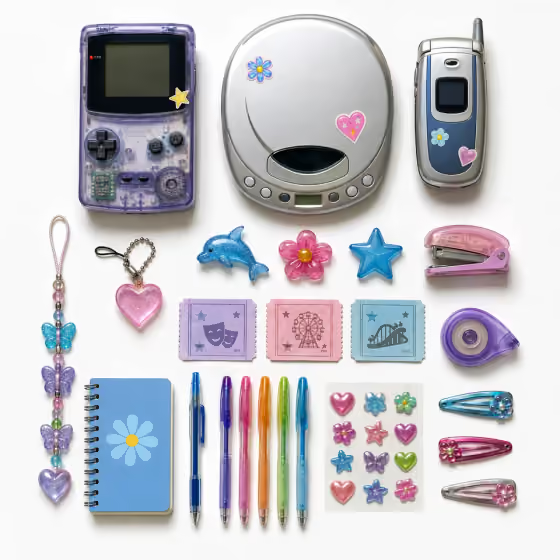
Time Capsule Flat Lay turns a theme into a clean, overhead product-photography grid. You name an era, fandom, place, or mood, list the objects that should represent it, and the template arranges them as a tidy square image, like the translucent handheld console, CD player, and flip phone laid out on white in the cover.
It suits anyone who likes nostalgia boards, collectible-style visuals, or themed objects shown in a catalog layout. You only type text, so no photo upload is needed, and the result comes out as a 1:1 image.
The fixed direction handles the camera angle and lighting for you: a precise overhead view with soft product lighting and crisp shadows. Your job is to decide what goes in the frame.
What works best as input
- There is no photo slot here, so everything comes from your words. Be specific in each text field instead of using broad labels.
- In Era or theme, name a clear era, fandom, place, or mood, such as "the year 2000" or "Paris art-school desk". A tight theme gives the objects a shared identity.
- In Hero objects, list a few main items that carry the composition. The cover's three large devices (game console, CD player, flip phone) show how a short list of distinctive objects anchors the layout.
- In Supporting objects, name small, flat details like stickers, ticket stubs, charms, or stationery. These fill the gaps around the hero objects without competing with them.
- Pick items that match your theme's era so the whole set feels consistent, rather than mixing unrelated periods.
How to use it
- Open the Time Capsule Flat Lay template in Phosphene.
- Fill in Era or theme, Hero objects, and Supporting objects with short, concrete descriptions. The placeholder text shows the style that works.
- Choose your Surface (white studio background, pale grid cutting mat, or soft pastel tabletop) and your Organization style (strict grid, museum catalog spacing, or playful balanced clusters).
- Generate the image, then check that the hero objects stand out, the layout is aligned, and the supporting items read as small details. Adjust your wording and run it again if needed.
Tips for a better result
- Match the surface to the mood. A clean white background keeps colorful objects like the pastel stationery in the cover popping, while a grid cutting mat adds a craft feel.
- Use the strictest Organization option when you want a catalog look, and the playful clusters option for a softer, scrapbook feel.
- Keep the hero list to a few items and make the supporting list richer. This keeps the composition readable and balanced.
- Try the same objects under different eras or themes to see how a single collection of items can feel nostalgic, travel-themed, or studious.
Common mistakes
- Listing too many hero objects. When everything is a main item, the grid loses its focal points and the supporting details get crowded out.
- Writing a vague theme like "old stuff". Without a clear era or mood, the objects will not feel like a coherent time capsule.
- Putting large items in Supporting objects or tiny trinkets in Hero objects, which flips the visual hierarchy the template is built around.
FAQ
Do I need to upload a photo?
No. This template is text only. You describe the theme, hero objects, and supporting objects in the fields.
What shape is the result?
The output is a square 1:1 image shown from directly overhead.
Can I control the lighting and camera angle?
Those are fixed by the template: an overhead flat-lay angle with soft product lighting and crisp shadows. You control the surface and the organization style.
What kinds of themes work?
Eras, fandoms, places, and moods all work, such as "1990s sleepover nostalgia", "Y2K beach vacation", or "Soviet space-age childhood".