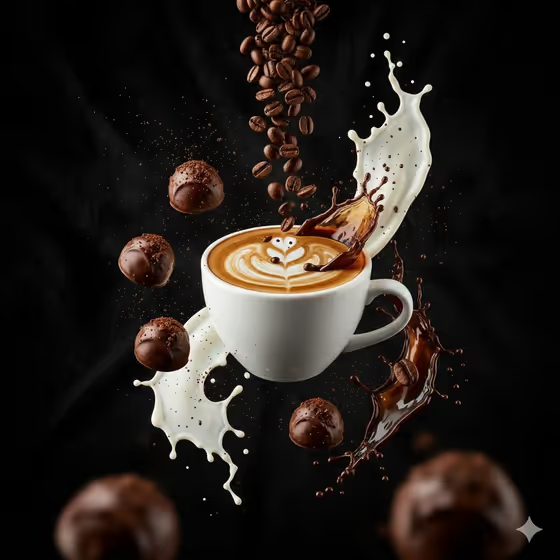
Coffee Elements in Flight makes a dramatic vertical product shot of a coffee drink suspended mid-air, surrounded by frozen splashes of milk and espresso, cascading beans, chocolate bonbons and fine grounds. The look in the cover is a white cup with latte art against deep black, lit like a macro studio ad.
It suits cafes, roasters, food bloggers and anyone who wants a poster-style coffee image for a menu, social post or product page. You name the drink and pick the orbit of floating elements, and the template handles the composition and lighting.
What works best as input
- In the Coffee Subject Product field, describe the drink and its cup specifically, for example a cappuccino in a ceramic cup or a glass espresso cup with crema. Specific cup, drink and surface details give the result a clearer centerpiece.
- This field accepts a photo as a reference, so you can add a clear picture of your actual cup or drink instead of (or alongside) the description. Pick a photo where the cup is fully visible and well lit.
- Mention foam or crema details you care about, such as swirling foam art or layered cream, since the template is built to preserve crema micro-detail.
- For the Floating Coffee Elements field, choose from the offered sets such as beans, bonbons, milk, espresso and grounds. This field is a choice, not a photo upload.
How to use it
- Open the Coffee Elements in Flight template in Phosphene.
- In Coffee Subject Product, type a description of your drink and cup, or add a reference photo of it.
- In Floating Coffee Elements, select the set of solids and splashes you want orbiting the cup.
- Generate the image, then check the 3:4 result for the cup shape, splash detail and bean placement, and adjust your description if needed.
Tips for a better result
- Match the elements to the drink: cinnamon, cream and cocoa pair naturally with a cappuccino, while coffee cherries, ice and cream suit a cold-brew glass.
- Try different cup materials in your description, such as glass, ceramic or a layered cold-brew glass, to change how light plays on the centerpiece.
- Include a short detail about the top of the drink, like crema or foam art, to give the macro lighting something to highlight.
- Run the same drink with two or three different element sets to build a small series of ads with a consistent black-background look.
Common mistakes
- Writing a vague subject like just coffee. Without a cup type or drink style, the centerpiece will be generic.
- Describing a busy scene, background or extra props in the subject field. The template already sets a deep black background and its own orbit of elements, so keep the field focused on the drink.
- Using a dark, blurry or cropped reference photo. The cup and drink are hard to read, which weakens the central subject.
FAQ
Can I use a photo of my own coffee?
Yes. The Coffee Subject Product field accepts a reference photo as well as a text description, so you can show your actual cup or drink.
Can I choose what floats around the cup?
Yes. The Floating Coffee Elements field lets you choose a set of solids and splashes, such as beans, bonbons, milk, espresso and grounds, or other combinations offered in the field.
What format is the result?
The template produces a single image in a vertical 3:4 ratio.
Can I change the black background?
The background is part of the template's fixed direction, a deep velvet black with high-contrast studio light, so the field options focus on the drink and the floating elements instead.