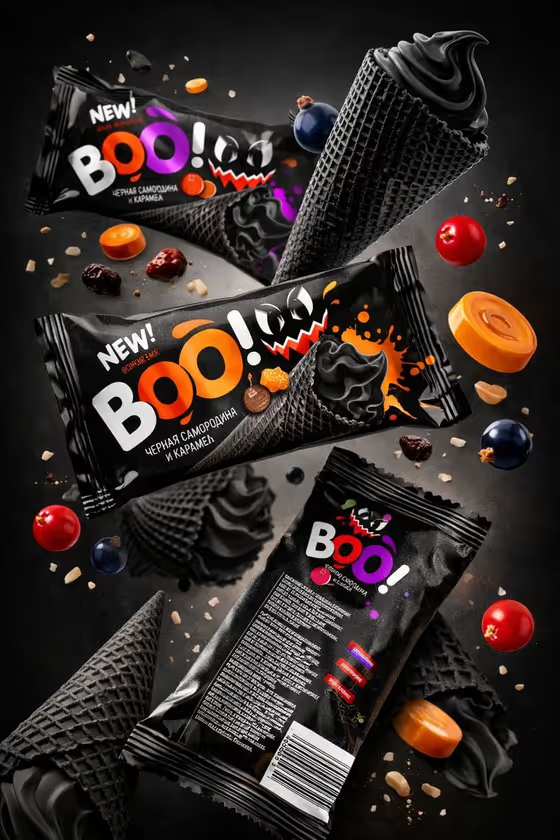
This template builds a vertical 3:4 campaign image of three snack packs floating on a diagonal, with front and back views, against a dark charcoal-to-black backdrop. Your brand wordmark sits large on the packs, and small color accents and suspended ingredients give the shot its flavor story.
It suits snack brands, designers and small food makers who want a bold launch visual or concept mockup without setting up a studio shoot. The cover shows the look: black wrappers, a bright wordmark, and cones, berries, candy discs and crumbs frozen mid-air around the packs.
What works best as input
- For Snack package product, you can describe the pack in text or upload a reference photo of it. A clear, evenly lit shot of the package works better than a cluttered one.
- If you describe it instead, name the product type and material, like the placeholder "a dark ice-cream snack pouch" or "a premium candy bag".
- Keep Package brand text short and bold, such as "BOO!", "CRUNCH!" or "SWIRL". Short words are easier to render as a large, readable wordmark.
- In Floating ingredients, list two or three concrete items that match your product, for example "candy discs, nuts, and cocoa", so the scene feels connected to the flavor.
- For Flavor accent palette, pick two or three colors that contrast with black packaging, like "purple, orange, and berry red".
How to use it
- Open the Floating Snack Pack Campaign template in Phosphene.
- Fill in Snack package product by typing a description or adding a reference photo of your pack.
- Enter your Flavor accent palette, Package brand text and Floating ingredients, using the examples in each field as a guide.
- Generate the image, then check the wordmark, the pack arrangement and the ingredients against what you intended.
Tips for a better result
- Make the floating ingredients match the flavor in your palette. In the cover, berries and caramel-colored discs echo the purple, orange and red accents.
- Try the example sets as a starting point, such as lime, yellow and cocoa brown with cookie pieces and chips, then swap in your own product details.
- If the wordmark looks off, shorten it or choose a simpler word and generate again.
- Run the same template with different palettes and ingredient lists to build a set of flavor variants for one product line.
Common mistakes
- Writing a long phrase in Package brand text. The template expects a large, readable pack wordmark, so long text is harder to keep clean.
- Choosing too many accent colors. The palette is meant as small color notes against dark packaging, so two or three colors keep it controlled.
- Listing ingredients that have nothing to do with the pack. Mismatched floating objects make the campaign feel unfocused.
FAQ
Do I have to upload a photo?
No. The Snack package product field accepts either a text description or a reference photo, so you can describe the pack instead.
Why are the packs black?
The template's direction is built around black packaging, with your flavor accent colors used as small highlights against it.
Can I change the brand name on the packs?
Yes. Type your own wordmark into Package brand text, like "NIGHT BITE" or "CRUNCH!".
What shape is the final image?
It is a vertical 3:4 image showing three packs, including front and back views, on a floating diagonal.