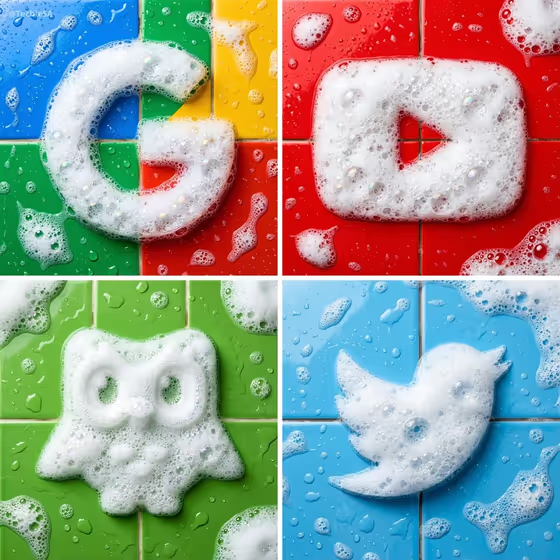
Foam Logo Tile Sculpture turns a logo or brand mark into a sculpture made of white soap foam, sitting on glossy wet colored tiles. The result is a centered, top-down image that looks like a bathroom product shot, with grout lines, water droplets and small suds scattered around the mark.
It suits designers, small brands, creators and social media managers who want a tactile, eye-catching way to show a logo. The cover shows the idea well: a simple mark rebuilt in foam, with the tile color doing the branding work behind it.
What works best as input
- For the Logo product or brand mark field, you can describe the mark in text or upload a matching reference. A clean, flat image of your logo gives the template the clearest shape to rebuild.
- Choose a logo with a bold, simple silhouette. The cover examples (a letter, a play-button shape, a mascot, a bird) all read clearly even when made of foam.
- If you describe the logo instead of uploading it, be specific about its shape, such as 'a rounded monogram logo' or 'a geometric wordmark', so the outline is recognizable.
- The Foam character field also accepts a photo reference or text. Use text like 'fine dense microbubbles' or 'glossy soap suds' to steer how the foam looks.
- Use an uncluttered reference image of the logo, without busy backgrounds or extra text around it, so only the mark gets turned into foam.
How to use it
- Open the Foam Logo Tile Sculpture template in Phosphene.
- Fill in Logo product or brand mark by typing a description or adding your logo as a reference. Then pick a Brand tile color, such as cobalt blue, coral red or emerald green.
- Set the Foam character to describe the bubbles, for example 'airy clustered bubbles' or 'mixed foam and clear bubbles', then generate the image.
- Review the result and check that the logo shape is still accurate. Adjust a field and generate again if the foam or tile color is not what you wanted.
Tips for a better result
- Match the Brand tile color to your brand palette, or try the brand-matched color option. Strong, saturated tile colors make the white foam stand out, as in the cover.
- Try different foam characters for variety. Fine dense microbubbles look smooth and compact, while airy clustered bubbles feel lighter and more open.
- Generate the same logo on several tile colors to build a matching set, like the four-panel layout in the cover image.
- Pick the foam style that suits the logo. Chunky mascots tend to suit glossy soap suds, while thin letterforms may suit denser foam.
Common mistakes
- Using a logo with lots of fine detail or small text. The foam can only hold so much detail, so simplify the mark first.
- Uploading a cluttered or low-quality logo image, which makes the silhouette harder to follow and can lead to a less accurate shape.
- Leaving the tile color vague. Without a clear color, the brand feel of the final image is left to chance, so choose one on purpose.
FAQ
Will the logo keep its exact shape?
The template is directed to rebuild the mark at its exact proportions in foam without redrawing or distorting it. Simple, clean logos give the most faithful results, so check the output against your original.
Can I type a description instead of uploading my logo?
Yes. The Logo product or brand mark field accepts text or a matching reference. Uploading your actual logo is the best way to get your specific shape rather than a generic one.
What does the Foam character field control?
It sets the look of the bubbles, such as fine dense microbubbles, airy clustered bubbles, glossy soap suds or a mix of foam and clear bubbles. You can type it or use a reference.
What will the final image look like?
A centered, top-down shot of a white foam version of your logo on glossy wet tiles, with grout lines, droplets, scattered suds and small foam shapes in the corners, in a 3:4 image.