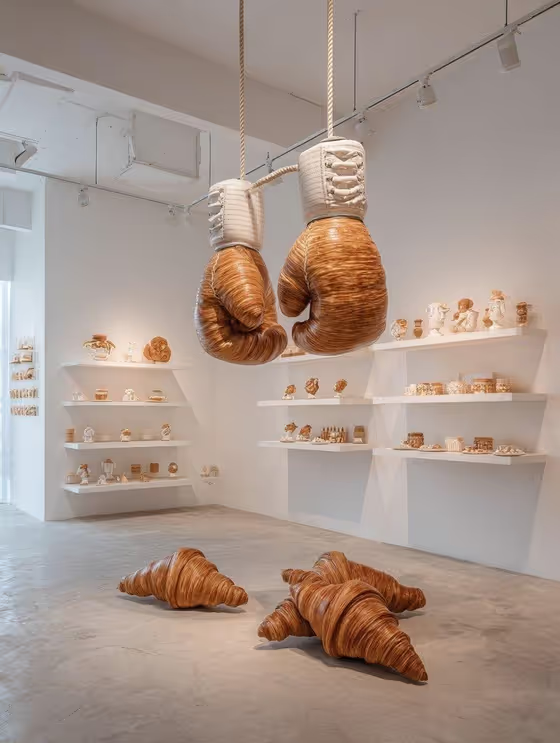
Croissant Sports Sculpture turns a subject and a setting into a gallery-style photo of oversized sports equipment made entirely from golden, flaky croissant pastry. The look follows the cover image: giant boxing gloves hanging from ropes, croissant forms resting on a smooth concrete floor, and white shelves of tiny pastry objects on bright gallery walls.
It suits anyone who wants a playful, surreal art-exhibition image for a social post, a poster idea, a concept board or just for fun. You only fill in two fields, Subject and Setting, and the template supplies the museum styling, pastry textures and lighting.
What works best as input
- The Subject field is a text field that also accepts a photo, so you can either describe the subject in words or add a clear visual reference. Pick one approach and keep it simple.
- If you use a photo, choose a sharp, well-lit image where the subject is easy to see and not hidden behind other objects or heavy filters.
- If you type instead, keep it short and concrete, like the examples: 'A confident adult' or 'A resilient outdoor adventurer'. One clear idea reads better than a long list.
- Describe the subject's general character or role rather than tiny details. The template is built around the sculpture, so the subject works best as a supporting element.
- For Setting, choose from the listed options such as a clean studio or a refined architectural interior, and keep in mind the template already adds a white contemporary gallery look.
How to use it
- Open the Croissant Sports Sculpture template in Phosphene.
- In Subject, type a short description or add a photo reference of who or what the piece should feature.
- Pick a Setting from the options provided, for example a clean studio or a misty natural landscape.
- Generate the image, then review the 3:4 result for a clear focal sculpture, believable pastry texture and a tidy gallery layout. Adjust your inputs and run it again if needed.
Tips for a better result
- Try each Setting with the same subject to compare how the mood shifts while the croissant sculpture stays the star.
- Keep the Subject wording consistent between runs when you want to see only the effect of changing the Setting.
- Use a character-driven subject, like a performer or an outdoor adventurer, to see how different personalities change the scene.
- If the first result feels crowded, simplify your Subject text. The template aims for one clear focal point with evenly spaced shelves.
Common mistakes
- Writing a long, detailed Subject with many objects or props. This can compete with the sculpture and clutter the composition.
- Adding a photo that is dark, blurry or crowded, which gives the template little to work from.
- Expecting a different art style. The look is fixed as a clean white gallery with warm museum lighting and pastry sculptures, so choices are limited to your subject and setting.
FAQ
What does the template actually make?
A single 3:4 image of a gallery scene featuring oversized sports gear, such as boxing gloves, made from croissants, with small pastry objects on white shelves.
Do I have to upload a photo?
No. The Subject field can be filled with a text description. It also accepts a photo if you want to give an exact visual reference.
Can I choose which sports equipment appears?
Not directly. The template's styling covers items like boxing gloves, dumbbells, basketballs, kettlebells and barbells, and your inputs are the Subject and Setting.
Why does my result still look like a white gallery when I change the Setting?
The gallery styling, concrete floor and museum lighting are part of the template's fixed direction, so the Setting adjusts the variation rather than replacing the gallery look.