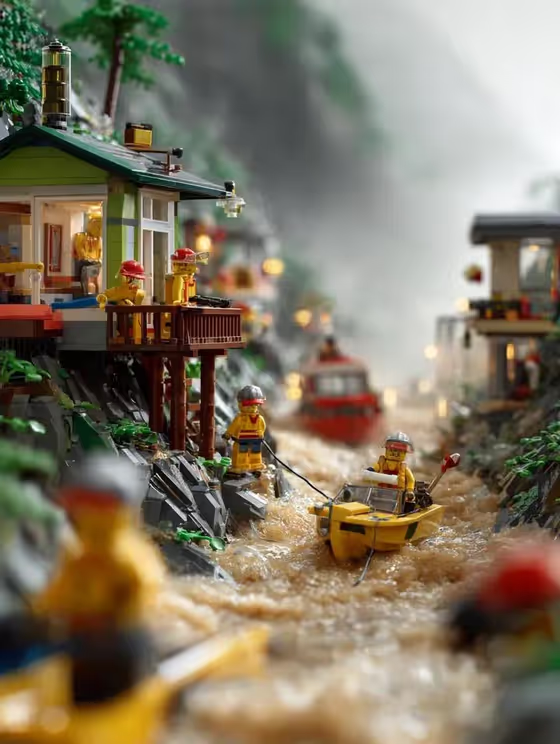
This template builds a miniature disaster scene entirely out of toy bricks: a steep mountainside village, homes on stilts and slopes, muddy floodwater, and a rescue team in action. The cover shows small yellow minifigure-style rescuers in red and grey helmets, a yellow boat on churning brown water, and misty mountains fading into the background.
It is made for anyone who likes the toy-brick look and wants a dramatic, storytelling image from a short setup. You choose who the rescuers are and what kind of rescue is happening, and the template handles the village, the storm light, and the vertical 3:4 framing.
What works best as input
- The Character or rescue team field takes text, and it can also take a photo as a matching reference. Pick whichever fits: type a description such as LEGO firefighters, or upload a reference of a team you want echoed in the scene.
- If you upload a reference, choose one where the characters or outfits are clear and easy to read, since the template will rebuild them as bricks. Busy backgrounds in the reference add nothing here.
- If you type instead, be concrete about the group and their gear. LEGO mountain rescue crew or LEGO emergency volunteers gives a clearer picture than a vague word like heroes.
- The Flood rescue action field is a choice list with no photo option, so just pick the action that matches the story you want, for example rope evacuation from a slope or sandbag line near houses.
How to use it
- Open the LEGO Mountain Flood Rescue template in Phosphene.
- In Character or rescue team, type who is performing the rescue, or add a matching reference photo if you have one.
- In Flood rescue action, pick the scene you want, such as boats crossing muddy overflow or a helicopter lift above the village.
- Generate the image, then look over the brick details, the water, and the rescuers. Adjust your inputs and run it again if you want a different crew or action.
Tips for a better result
- Try the same team with different actions. A crew shown crossing floodwater by boat will read very differently from the same crew on a rope evacuation along a slope.
- Name a specific group like LEGO firefighters or my brick-built rescue team so the characters feel intentional rather than generic.
- Pick one action per run. The template is built around a single clear rescue moment, so the composition stays readable.
- Expect a tall portrait result, so think of it as a poster or phone-wallpaper style image.
Common mistakes
- Typing a long, multi-part story into the team field. Keep it to who the characters are and let the action field carry what they are doing.
- Uploading a reference with many people or heavy clutter. A cluttered reference makes it harder for the characters to come through clearly as bricks.
- Expecting a realistic photo of a real place. The template always builds the whole scene from toy bricks, so the result is a miniature, not a documentary image.
FAQ
Do I have to upload a photo?
No. The Character or rescue team field accepts typed text, and a photo is optional as a matching reference. The Flood rescue action field is a simple choice.
What kinds of rescue actions can I pick?
The examples include boats crossing muddy overflow, rope evacuation from a slope, a sandbag line near houses, and a helicopter lift above the village.
What shape is the image?
It is a vertical 3:4 image, which suits posters and phone screens.
Can I change the toy-brick look?
The brick construction, rain, muddy water, and misty mountains are fixed parts of this template. You control the characters and the rescue action.