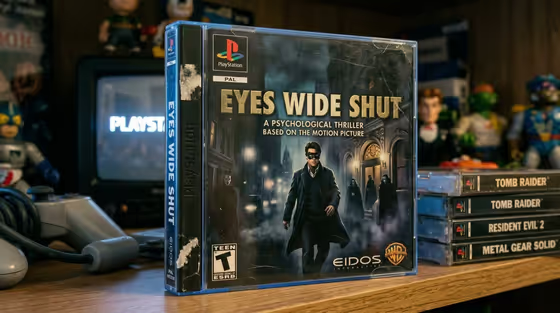
Retro PS1 Game Case turns a movie idea into a photo of a worn PlayStation 1 game case, as if the film once got a late-1990s tie-in game that no one should have made. The case sits upright in a dim gaming room, with a CRT showing the PlayStation startup screen, a gray controller on the left and a stack of Tomb Raider, Resident Evil 2 and Metal Gear Solid cases on the right.
It is built for movie fans, meme makers and anyone who enjoys a convincing piece of fake nostalgia. You give it one movie concept, and that movie becomes both the printed game title and the source of the cover art, recast as a dramatic action-game cover.
What works best as input
- The single field, Movie Tie-In Concept, takes text, and it also accepts a photo. Use the text to name a period-appropriate movie and describe its defining poster imagery.
- Describe the cover figure the way the default does: who they are, what they wear, and where they are. The default example mentions a masked man in a black suit, white shirt, black tie and long black overcoat on a misty gothic street at night.
- If you add a poster, logo or visual reference instead of (or alongside) the text, pick one with a clear central figure and a readable title so the game title and cover art can be drawn from it.
- Mention setting details such as streetlamps, mist, lit windows or shadowy figures. The cover in the example leans on exactly this kind of atmosphere.
- Stick to one movie per generation. The template expects a single film to supply the title, the figure and the setting.
How to use it
- Open the Retro PS1 Game Case template in Phosphene.
- In the Movie Tie-In Concept field, name the movie and describe its defining poster imagery, or add a poster, logo or visual reference.
- Generate the image. The output is a 3:4 photo of the worn jewel case on a shelf with the CRT, controller and stacked games.
- Check that the printed title matches your movie and that the cover art follows your description, then adjust the field wording and run it again if you want a different look.
Tips for a better result
- Be specific about the central figure's clothing and pose. The template places that figure at the center of the cover, so details like a long coat or a mask carry through.
- Describe the mood of the setting, such as wet streets, fog or glowing lamps, to give the cover art the dark, dramatic feel of a late-1990s action game.
- Try films from the same era as the stacked games, since the template asks for a period-appropriate movie and the shelf is full of 1990s PlayStation titles.
- Leave the field at its default idea to see how the full layout works, with subtitle lines, rating badge and publisher marks, then change the movie to compare.
Common mistakes
- Writing only a title with no imagery. Without a described figure or setting, the cover art has less to work from.
- Describing several movies or mixing franchises in one entry, which can make the title and artwork pull in different directions.
- Expecting to control the shelf items. The CRT, controller and stacked game spines are part of the fixed scene, so put your effort into the movie concept instead.
FAQ
Do I have to upload a photo?
No. The Movie Tie-In Concept field is required, but it works with text alone. You can also add a poster, logo or visual reference if you have one.
What does the game title come from?
The template uses your chosen movie as both the printed game title and the source of the cover art.
Can I change the other games on the shelf?
The surrounding scene is fixed, including the CRT startup screen, the controller and the stacked cases. Only the movie concept in the field changes.
What format is the result?
A single 3:4 image styled as a photograph of an aged, scuffed PlayStation 1 PAL jewel case.